Python Strings and f-strings, Explained
Create, slice, and format text in Python: quotes, indexing, the string methods you'll actually use, and clean f-string formatting.

Almost every program you'll write touches text. Names, error messages, the contents of a file, a line a user types, the URL of a page you're scraping. All of it is text, and in Python text lives in a type called a string. Get comfortable with strings and a huge chunk of real programming stops feeling mysterious.
Making strings
A string is just characters wrapped in quotes. Python lets you use single or double quotes, and it doesn't care which. Pick one and stay consistent:
name = 'Ada'
greeting = "Hello there"
The reason both exist is convenient: if your text contains one kind of quote, wrap it in the other and you never have to fight with it.
quote = "It's a string"        # apostrophe is fine inside double quotes
shout = 'She said "hi"'         # double quotes are fine inside single quotes
When you need quotes that match the wrapper, escape them with a backslash. The backslash also unlocks a few special characters: \n is a newline, \t is a tab.
print('It\'s fine')            # It's fine
print("Line one\nLine two")    # prints across two lines
print("Name:\tAda")            # tab between Name: and Ada
For text that genuinely spans multiple lines, triple quotes are cleaner than peppering \n everywhere. Anything between the triple quotes is kept exactly as written, line breaks and all:
message = """Dear reader,
Welcome to Logic Decode.
See you next lesson."""
Indexing and slicing
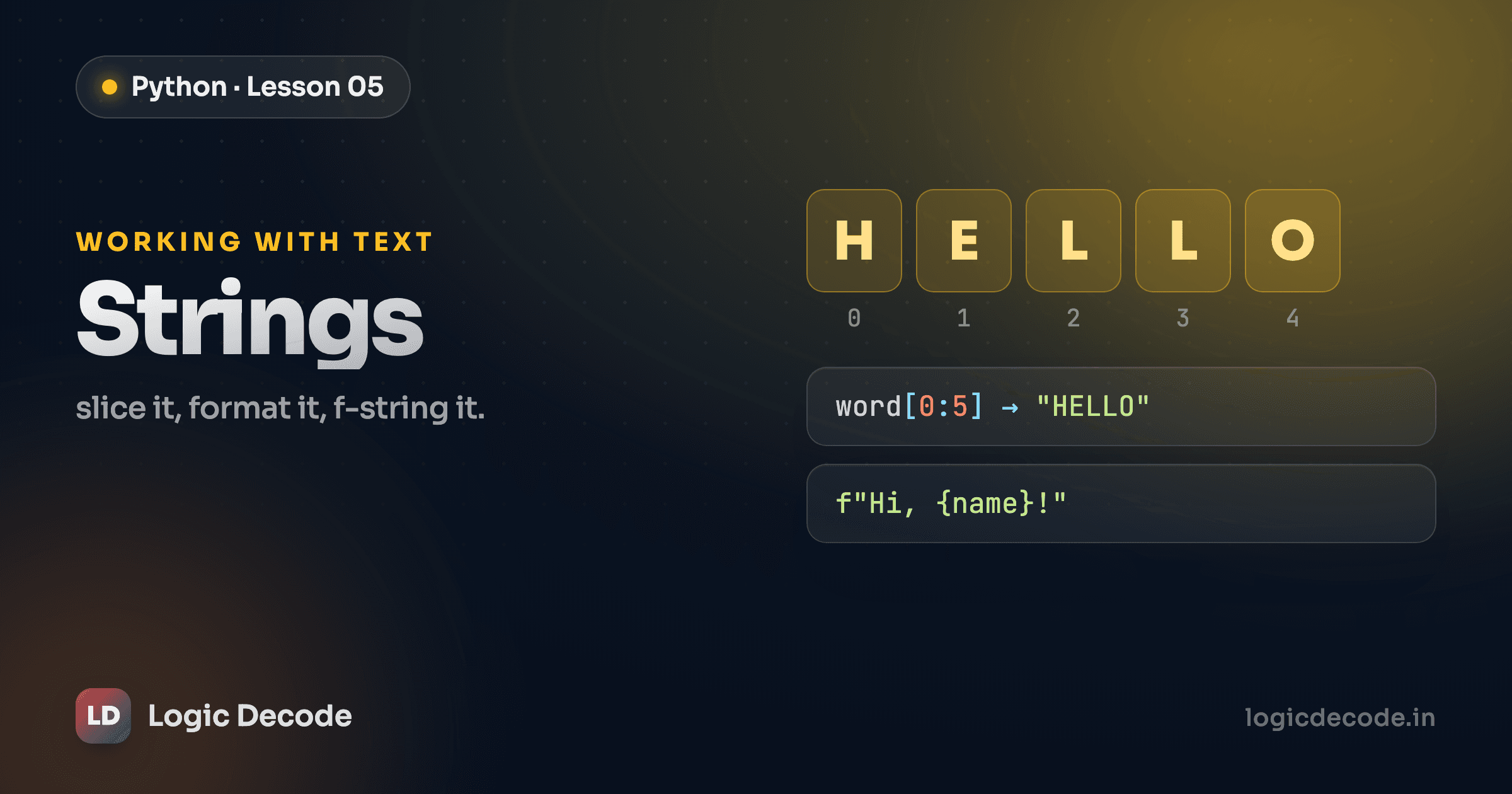
A string is an ordered sequence of characters, and you can reach into it by position. Python counts from zero, so the first character is at index 0, not 1. This trips up everyone once, then never again.
s = "Python"
print(s[0])     # P  — first character
print(s[1])     # y
Negative indexes count from the end, which saves you from doing arithmetic with len(). So s[-1] is always the last character:
print(s[-1])    # n  — last character
print(s[-2])    # o
Grabbing a range of characters is called slicing, written s[start:stop]. The catch worth burning into memory: start is included, stop is not. So s[1:4] gives you positions 1, 2, and 3, but not 4.
s = "Python"
print(s[1:4])   # yth
Leave a side blank and Python fills in the obvious default: start of the string, or all the way to the end:
print(s[2:])    # thon  — from index 2 to the end
print(s[:2])    # Py    — from the start up to (not including) index 2
Run this and change the numbers until slicing feels automatic:
Quick check
What does "Logic Decode"[6:] return?
Useful string methods
Strings come with built-in tools called methods. You call them with a dot after the string. These are the handful you'll reach for constantly:
text = "  Logic Decode  "

print(text.upper())            # '  LOGIC DECODE  '
print(text.lower())            # '  logic decode  '
print(text.strip())            # 'Logic Decode'  — trims the spaces
print(text.strip().replace("Decode", "Rocks"))   # 'Logic Rocks'
.strip() removes leading and trailing whitespace, which is gold when you're cleaning up user input or a line read from a file. .replace(old, new) swaps every occurrence of one substring for another.
.split() chops a string into a list of pieces. Give it a separator and it breaks on that. This is how you turn a comma-separated line into real data:
csv_line = "apple,banana,cherry"
print(csv_line.split(","))     # ['apple', 'banana', 'cherry']
And len() isn't a method. It's a function you wrap around the string, but it belongs here because you'll use it with text all the time. It counts characters, spaces included:
print(len("Logic Decode")) # 12Tip
Strings are immutable. You can't change one in place. Methods like .upper() and .replace() don't edit the original. They build and return a new string. So text.upper() on its own changes nothing. If you want to keep the result, assign it: text = text.upper().
f-strings
Here's the part you'll use in basically every program: building a string out of variables. The old way was gluing pieces together with +, and it gets ugly fast. You have to convert numbers yourself and babysit every space:
name = "Ada"
age = 30
print(name + " is " + str(age) + " years old")   # works, but tedious
The modern way is an f-string. Put an f right before the opening quote, then drop any variable inside { } and Python substitutes its value. No +, no manual str(), no counting spaces:
name = "Ada"
age = 30
print(f"{name} is {age} years old")               # Ada is 30 years old
Cleaner, and it reads like the sentence you're trying to produce. You can put any expression inside the braces, not just a bare variable:
price = 4
print(f"Two coffees cost {price * 2} dollars")    # Two coffees cost 8 dollars
Build a sentence from a few variables and run it:
Once f-strings click, you'll never go back to stitching strings with +.
Recap and what's next
Strings hold text, wrapped in single, double, or triple quotes, with \n and \t for line breaks and tabs. You reach into them by position (zero-based, with negatives counting from the end) and pull out ranges with slices like s[1:4]. Methods like .upper(), .strip(), .replace(), and .split() clean and reshape text, and because strings are immutable, those methods hand you a new string rather than changing the old one. And f-strings are the clean way to weave variables into text.
Text is one kind of value, numbers are another, and if you skipped it, Python's data types is worth a look. Next we move from single values to collections, storing many things at once with lists, tuples, and sets.

Written by
Rhythm Bhiwani
Engineer and relentless builder, happiest reverse-engineering hard problems until they click.
Enjoyed this?
Tap the heart to leave some love.
Be the first to react
Comments
Join the conversation.
Loading comments…