CSRF: making the browser betray its user
How cross-site request forgery uses a browser's own cookie-sending rules to trigger actions a logged-in user never asked for, and how to actually stop it.

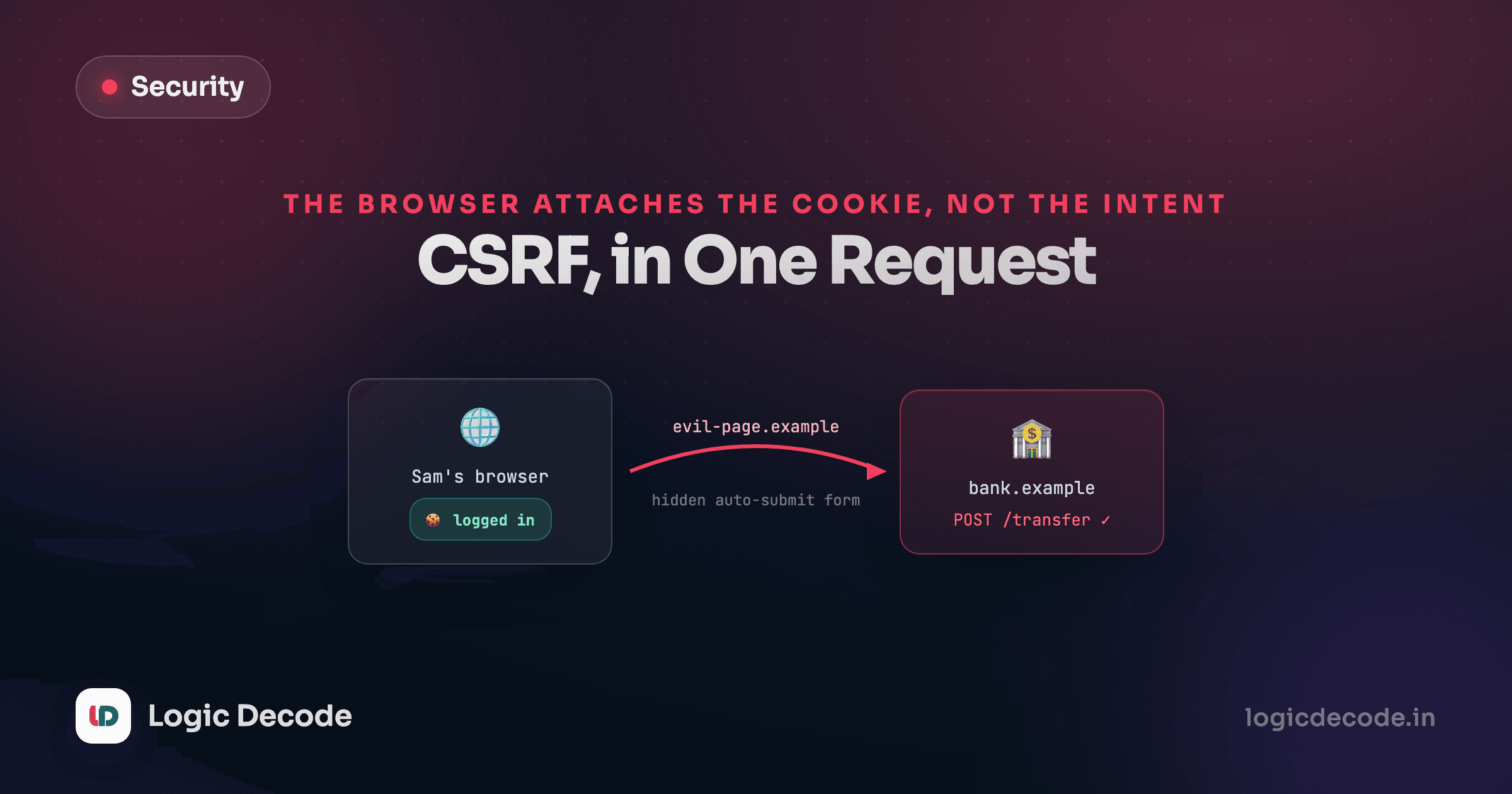
XSS needs to get code onto your page. CSRF doesn't bother. It uses a page you never loaded, on a site you never trusted, and it still gets your bank, your inbox, or your app to act like the request came from you. The trick isn't clever code. It's a browser default nobody thinks about until it bites them.
The default that makes this possible
Cookies attach to a request based on the domain they belong to, not on which site asked for the request. Log into bank.example, and your browser holds a session cookie for bank.example. Visit an unrelated site in another tab, and if that site's page fires a request at bank.example, your browser attaches the cookie anyway. It doesn't ask whether you meant it. It just matches the domain.
Nothing here needs a stolen password or a script running on bank.example. The victim's own browser does the attacker's work, because the browser's job is to attach the right cookie to the right domain, and it did exactly that.
What the attack page actually looks like
A form is enough. No JavaScript required, though JavaScript makes it auto-submit instead of waiting for a click:
<form action="https://bank.example/transfer" method="POST" id="f">
  <input type="hidden" name="to" value="attacker-account" />
  <input type="hidden" name="amount" value="5000" />
</form>
<script>document.getElementById("f").submit();</script>
The victim opens some unrelated page, this form fires in the background, and the browser sends a real POST /transfer to bank.example with the victim's session cookie attached. If bank.example only checks "is there a valid session," this request passes. It looks identical to one the victim's own dashboard would have sent.
CSRF can't read the response
The same-origin policy stops evil.example's script from reading what bank.example sends back. That's why CSRF targets actions, not data theft: a transfer, a password change, a new admin account, an email address swap. The attacker doesn't need to see the response to have already caused the damage.
Why Linkstash doesn't need a CSRF token
This is a good moment to look at how the app this series attacks actually handles auth, because the design itself is a defense. Every protected Linkstash route reads its credential from a header, not a cookie:
function requireAuth(req: Request, res: Response, next: NextFunction) {
  const header = req.get("authorization") ?? "";
  const token = header.startsWith("Bearer ") ? header.slice(7) : "";
  const userId = token ? userIdForToken(db, token) : null;
  if (userId === null) {
    res.status(401).json({ error: "Unauthorized" });
    return;
  }
  req.userId = userId;
  next();
}
An HTML form has no way to set a custom Authorization header. Neither does a plain <img> or a background redirect, the classic CSRF delivery methods. A browser attaches cookies to a cross-site request automatically. It does not invent an Authorization: Bearer … header out of nowhere and attach that too. For an attacker's page to call DELETE /links/3 on Linkstash, its script would need to already know the victim's token, and if it knows that, CSRF wasn't the way in. Something else already went wrong.
This is one real reason a lot of modern APIs default to bearer tokens over session cookies. It isn't just a style preference, it removes an entire attack class for free.
When you do need real defenses
Plenty of apps do need cookie-based sessions, browser-rendered dashboards especially, where a header-only design is awkward. If your app authenticates with a cookie, treat CSRF as a real threat and stack these:
SameSite on the cookie. Set it explicitly instead of trusting the default:
res.cookie("session", token, {
  httpOnly: true,
  sameSite: "strict", // or "lax" if you need cross-site GET navigation to still work
  secure: true,
});
Strict withholds the cookie on any cross-site request, full stop. Lax (the modern browser default when nothing is set) still attaches the cookie on a top-level navigation, like clicking a link, but not on a background form POST or an image tag. Lax covers the classic attack above. It does not cover every case, particularly state-changing GET requests, which is a separate reason GET should never change data.
A CSRF token, if you need to support older or misconfigured clients. The server issues a random token tied to the session, embeds it in the page, and requires it back on every state-changing request as a header or hidden field. An attacker's form can't see or set that token, because it can't read your page, so it can't replay it.
Check Origin or Referer on state-changing requests. Cheap and effective as a second layer: if POST /transfer arrives with an Origin header that isn't your own domain, reject it.
Quick check
Why can't a page on evil.example forge a request that passes Linkstash's requireAuth check?
The general lesson
CSRF is what happens when "the request looks legitimate" and "the user meant to send it" quietly become the same check in your code. They aren't the same thing, and the fix is always some version of separating them: a token the attacker can't see, a cookie policy that withholds itself cross-site, or an auth scheme that never rides along with the browser's defaults in the first place. If you've read how CORS controls cross-origin reads, CSRF is the mirror image: CORS is about who's allowed to read a response, CSRF is about who's allowed to trigger a side effect.
Next: authentication attacks, where the login form itself is the target.

Written by
Rhythm Bhiwani
Engineer and relentless builder, happiest reverse-engineering hard problems until they click.
Enjoyed this?
Tap the heart to leave some love.
Be the first to react
Comments
Join the conversation.
Loading comments…