Environment variables and config in production
Move Linkstash's config out of the systemd unit into a proper env file, and see why a real DATABASE_FILE path is where SQLite's WAL mode actually matters.

Back in lesson 4, the systemd unit set PORT and DATABASE_FILE with two Environment= lines directly inside linkstash.service. That's fine for two variables. It stops being fine the moment you have five or six, need different values for a staging server versus production, or want to change a value without editing a file that also controls how the process starts and restarts. This lesson is about separating "how the app runs" from "what values it runs with," which is the actual shape production config takes.
Why config lives outside the code
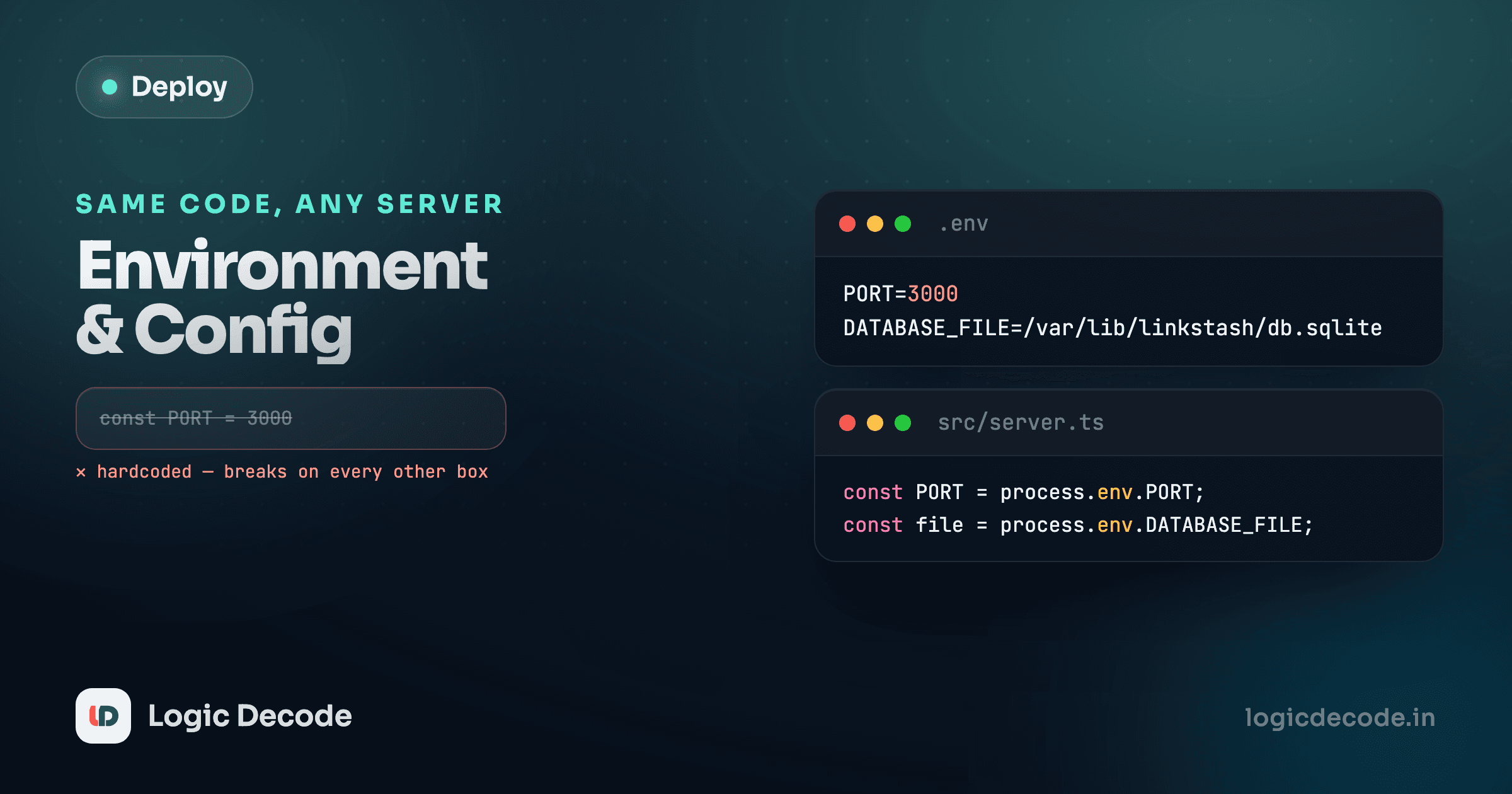
Linkstash reads exactly two environment variables today, both with sensible defaults baked in:
const port = Number(process.env.PORT ?? 3000);
const app = createApp(openDb(process.env.DATABASE_FILE ?? "linkstash.db"));
Notice what's not hardcoded here: no port number, no file path baked into the source. That's deliberate, and it's the whole idea behind the twelve-factor app principle of config: anything that varies between environments (which port to bind, where the database lives, which external services to call) belongs outside the code, read at start time. The alternative, hardcoding 3000 and linkstash.db directly, means every environment either needs its own copy of the source or fights over the same values. An environment variable read once at startup solves that cleanly.
Moving config into an env file
Instead of Environment= lines scattered through the unit, put them in one file and point systemd at it:
sudo nano /etc/linkstash/linkstash.envPORT=3000
DATABASE_FILE=/home/deploy/linkstash/data/linkstash.db
NODE_ENV=productionLock it down so only root and the deploy user can read it, since it's about to hold values you don't want world-readable:
sudo mkdir -p /etc/linkstash
sudo chown root:deploy /etc/linkstash/linkstash.env
sudo chmod 640 /etc/linkstash/linkstash.env
Now update the unit file to load it, replacing the individual Environment= lines:
[Service]
Type=simple
User=deploy
WorkingDirectory=/home/deploy/linkstash
EnvironmentFile=/etc/linkstash/linkstash.env
ExecStart=/usr/bin/node src/server.ts
Restart=on-failure
RestartSec=5
EnvironmentFile reads every KEY=value line in that file and injects it into the process's environment before ExecStart runs. Apply it the same way as any unit change:
sudo systemctl daemon-reload
sudo systemctl restart linkstash
Now changing a value is a one-line edit to linkstash.env and a restart, not a trip through the service definition that also controls restart behavior and the user it runs as. That separation matters more as the list of variables grows.
Where DATABASE_FILE actually earns its keep
Here's the part that's easy to skip past: in every test you've written against Linkstash, openDb() was called with no argument, which defaults to :memory:, an in-memory SQLite database that exists only for the life of that process and vanishes the instant it exits. Fast, disposable, perfect for tests. But look again at db.ts:
export function openDb(file = ":memory:") {
  const db = new Database(file);
  db.pragma("journal_mode = WAL");
That journal_mode = WAL line runs unconditionally, on every database, memory or file. It sets SQLite's write-ahead logging mode, which changes how writes are journaled before being committed. Against an in-memory database, that pragma is essentially a no-op: there's no real file, no concurrent readers competing with a writer, nothing WAL mode is protecting you from. The moment DATABASE_FILE points at /home/deploy/linkstash/data/linkstash.db, a real file on a real disk, that same line stops being decorative. WAL mode lets a read (say, GET /links) proceed concurrently with a write (POST /links) instead of blocking one behind the other, which is exactly the situation a running production server hits constantly and a test suite never does.
This is one of those details that's invisible until it isn't. Point DATABASE_FILE at a real path and you'll also see two extra files appear alongside it:
ls -la /home/deploy/linkstash/data/linkstash.db
linkstash.db-shm
linkstash.db-wal-wal is the write-ahead log itself, and -shm is shared memory used to coordinate access to it. Both are normal, expected, and part of how WAL mode works. Make sure the directory holding all three is owned by the deploy user, or the app fails to start with a permissions error the moment it tries to open a real file instead of an in-memory one.
Back up all three files together
If you ever script a backup of the database, copy linkstash.db, linkstash.db-shm, and linkstash.db-wal together, or stop the service first. Copying just the main .db file while WAL is active can miss committed writes that are still sitting in the log.
Quick check
Why doesn't journal_mode = WAL make a visible difference in Linkstash's test suite?
What this lesson doesn't cover
Notice linkstash.env doesn't have a database password or an API key in it, because Linkstash doesn't need one yet. The moment a real deployment adds a third-party service, a signing secret, or anything sensitive, you're no longer just managing config, you're managing secrets, and that's a sharper problem: how to keep them out of git, how to rotate one that leaked, how to structure access so not every process reads every secret. That's exactly what secrets and config in the security series covers, including the specific story of a committed API key and what to do the day you find one. Read it before this server holds anything you'd mind an attacker seeing.
Config now lives in one small, permission-locked file instead of scattered through your service definition, and you've seen exactly where WAL mode stops being theoretical. Next: logs, monitoring and knowing when it breaks, because a server running quietly isn't the same as a server running correctly.

Written by
Rhythm Bhiwani
Engineer and relentless builder, happiest reverse-engineering hard problems until they click.
Enjoyed this?
Tap the heart to leave some love.
Be the first to react
Comments
Join the conversation.
Loading comments…