HTTPS and TLS: how the padlock works
How TLS encrypts a connection, why TLS 1.3 needs one round trip instead of two, and what the browser padlock does and doesn't protect.

The padlock icon in your browser's address bar gets treated like a seal of trust: green means safe, missing means danger. What it actually certifies is much narrower than that, and understanding exactly what it promises, and what it doesn't, is the difference between using HTTPS and understanding it.
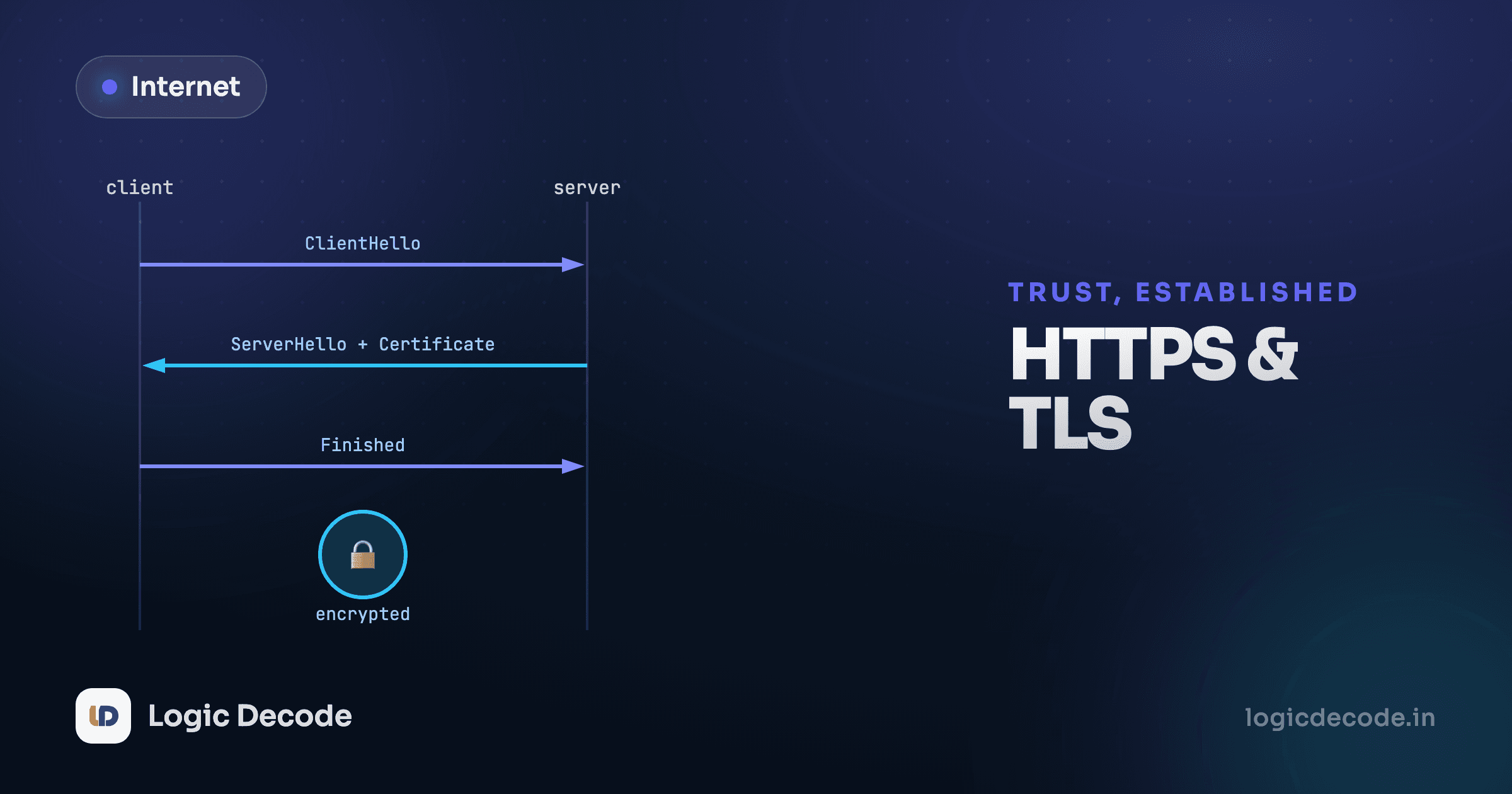
By the time HTTPS gets involved, TCP has already opened a connection (see the TCP lesson). TLS, Transport Layer Security, runs on top of that connection and does two jobs: it proves you're talking to who you think you're talking to, and it encrypts everything sent afterward so nobody in between can read it.
What a TLS handshake actually negotiates
Before any HTTP request goes out, the browser and server run a handshake. Three things need to happen: they need to agree on encryption methods, the server needs to prove its identity with a certificate, and both sides need to derive a shared secret key they'll use to encrypt everything else. Step through a real one below.
Supported ciphers, plus a key share guessed up front. That guess is what saves the round trip. The SNI extension here names the host in cleartext, which is why Encrypted Client Hello exists.
Watch the certificate step. The server sends a certificate, issued by a certificate authority (CA) both the server and your browser already trust, proving "this public key really belongs to logicdecode.in." Your browser checks that certificate against a built-in list of trusted CAs. If it doesn't check out, expired, wrong domain, signed by nobody your browser trusts, you get the big red warning page instead of the site.
What TLS 1.3 actually hides, and what it still leaks
It's common to hear that TLS 1.3 hides the hostname you're connecting to, because it encrypts the server's certificate. That's half true, and the half that's wrong matters. TLS 1.3 does encrypt the Certificate message, so a passive observer watching the handshake no longer learns which certificate the server presented. But the very first message of the handshake, the ClientHello, is still sent in cleartext, and it includes the SNI (Server Name Indication) extension: the plain-text hostname you're asking to connect to. Anyone watching the network can still see that you connected to logicdecode.in, even on TLS 1.3. Closing that gap needs a separate mechanism called Encrypted Client Hello (ECH), which is still being rolled out across the web and isn't part of a standard TLS 1.3 handshake. "Encrypted" in TLS is never all-or-nothing. Always ask which specific part of the exchange is actually protected.
Why TLS 1.3 is faster than TLS 1.2
Switch the version selector in the visualizer above to TLS 1.2 and count the round trips. TLS 1.2 needs two full round trips before any application data can flow: one to agree on a cipher suite, one more to actually exchange key material and finish the handshake. TLS 1.3 collapses this into one round trip.
The reason comes down to how much guessing TLS 1.3 is willing to do up front. TLS 1.2 has the client propose a long list of supported cipher suites and wait for the server to pick one, then negotiate key exchange as a separate step once that's settled. TLS 1.3 has the client send its key exchange material speculatively, in the very first message, guessing which method the server is likely to support (in practice, nearly every server supports the same small set now, so the guess is almost always right). If the guess is right, and it almost always is, the server can finish the whole handshake in its very next reply. One round trip instead of two, purely because TLS 1.3 assumes agreement instead of negotiating it turn by turn.
That's not a minor speed bump. A round trip across a real network, especially on mobile, can be 50 to 150 milliseconds. Cutting one out of every single HTTPS connection, on every site, adds up to a meaningful chunk of how fast the modern web feels.
Quick check
Why does TLS 1.3 typically need only one round trip before the handshake completes, compared to TLS 1.2's two?
What the padlock actually promises
The padlock means two specific things: the connection is encrypted, so someone snooping on the network (a coffee shop Wi-Fi, an ISP, anyone between you and the server) can't read the contents, and the server proved it holds the private key matching a certificate for that domain, issued by a CA your browser trusts.
It does not mean the site is trustworthy, safe, or run by who you think it's run by. A convincing phishing site can get a perfectly valid certificate for logicdecode-login.com and show the exact same padlock. It does not mean your data is safe once it reaches the server. TLS protects data in transit, not what the server does with it afterward. Free certificate authorities like Let's Encrypt made getting a valid certificate essentially free and automatic starting around 2016, which is genuinely great for the web's baseline security, and also means "has a padlock" stopped being a meaningful trust signal on its own well before that.
Why this matters for everything after it
TLS is why cookies (covered two lessons from now) can safely carry a session token without every network operator between you and the server being able to steal it. It's why CORS, covered after that, matters at all, the browser is enforcing rules about which sites can read encrypted responses meant for someone else. Get comfortable with what TLS actually protects, and both of those lessons will make a lot more sense.
For hands-on practice, openssl s_client -connect logicdecode.in:443 lets you inspect a real certificate from your terminal, exactly the handshake you just stepped through above, happening for real. Lesson 12 uses this directly.
Encryption solves privacy and identity. It doesn't solve speed, and the original version of HTTP running over it had a real performance problem of its own. On to Why HTTP got rewritten twice.

Written by
Rhythm Bhiwani
Engineer and relentless builder, happiest reverse-engineering hard problems until they click.
Enjoyed this?
Tap the heart to leave some love.
Be the first to react
Comments
Join the conversation.
Loading comments…