IP addresses and packets: how data finds you
What an IP address actually is, why data travels in packets instead of one stream, and how routers pass them along. The layer under DNS and TCP.

Every device on the internet has an address, and none of them know the way to anywhere. That sounds like it should be a problem. It isn't, because the internet was never designed around any single machine knowing the full route. It was designed around every machine knowing one thing: which direction is probably closer. This lesson is about that address, and the small chopped-up units of data, called packets, that travel across the internet one hop at a time using nothing but that local knowledge.
What an IP address actually is
An IP address is a number assigned to a device so other devices can send data to it. That's the whole idea. You've seen the format: 192.0.2.10. That's IPv4, four numbers from 0 to 255 separated by dots, giving about 4.3 billion possible addresses. It sounded like a lot in 1981. It is not enough for a planet with tens of billions of connected devices, which is why IPv6 exists: addresses like 2001:0db8:85a3::8a2e:0370:7334, with a space so large that assigning one to every device we'll ever build isn't a scarcity problem anymore. Most consumer traffic today is still IPv4, patched over with tricks like NAT (letting a whole household share one public address), but IPv6 adoption keeps climbing because it removes that patch entirely.
Two addresses matter for almost everything you'll debug:
- Public IP address. The one your internet connection presents to the outside world. This is what a server sees when your browser connects to it, and it's what DNS resolves a domain name to.
- Private IP address. The one your device has on your home or office network, usually something like
192.168.1.42or10.0.0.5. These ranges are reserved for local use and never routed on the public internet, which is why your router does the job of translating between the two (that's NAT).
Run ip addr on Linux, ipconfig on Windows, or ifconfig on macOS and you'll see your machine's private address right now.
Data doesn't travel in one piece
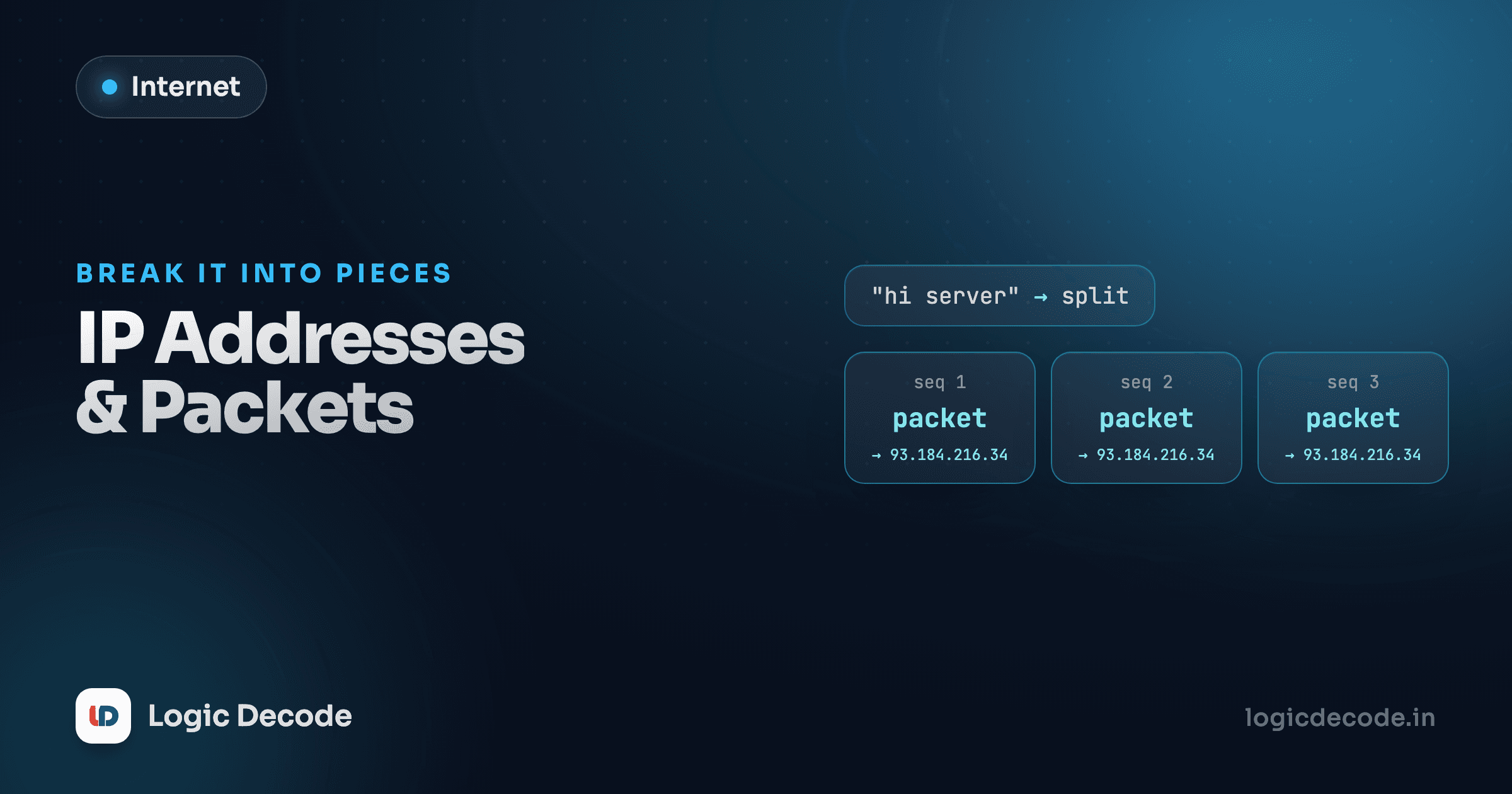
Here's the part that trips people up: your browser doesn't open a pipe and pour a whole webpage down it in one continuous stream. It chops everything into packets, small units of data (often around 1,500 bytes on typical networks) each wrapped in its own header describing where it came from and where it's going.
Think of mailing a book by tearing out each page and posting it separately, with every envelope addressed to the same place. Sounds wasteful, but it buys you something huge: if one envelope gets lost or damaged, you only need to resend that one page, not the whole book. And different pages can travel by different routes and still all arrive, because each one carries its own complete address.
Each packet's header includes, at minimum:
- Source IP: where it came from
- Destination IP: where it's going
- Protocol: what kind of data is inside (TCP, UDP, and so on)
- A sequence marker: so the receiving end can reassemble packets in the right order, since they don't always arrive in the order they were sent
That reassembly job, along with retransmitting anything that goes missing, is TCP's responsibility, which the next lesson covers in full. IP's job stops at getting a single packet from A to B. It doesn't guarantee delivery, doesn't guarantee order, and doesn't care if a packet vanishes. That's on purpose: keeping IP simple is exactly what let the internet scale to billions of devices without a central coordinator.
How a packet finds its way: routers and hops
No single machine on the internet has a map of the whole network. What every router has is a routing table: a list of "if the destination looks like this, send it in that direction." A packet moves from router to router, each one just picking the best next hop it knows, until it either arrives or a router along the way recognizes the destination as directly reachable.
This is why the classic traceroute tool is genuinely useful and not just a novelty. It sends packets toward a destination with a deliberately short lifespan and watches which router bounces each one back, building up the actual hop-by-hop path your data takes.
traceroute logicdecode.in
# 1  192.168.1.1 (home router)         1.2 ms
# 2  10.20.0.1 (ISP edge)              8.4 ms
# 3  203.0.113.9 (ISP backbone)       11.7 ms
# ...
# 9  198.51.100.42 (destination)      41.3 ms
Each row is a router the packet passed through, and the time is how long that hop took. On a normal connection this is 10 to 20 hops. If a site feels slow, traceroute (or tracert on Windows) is often the fastest way to see whether the delay is your network, your ISP, or something happening deep in the middle of the internet where you have no control at all.
Quick check
A packet from your laptop to a server crosses six different routers on the way, and the fourth router is temporarily down. What happens?
Why this layer matters even though you rarely touch it
You will probably never write code that constructs a raw IP packet by hand. So why does this matter? Because almost every networking problem you'll debug as a developer eventually gets described in these terms: "the connection timed out" (a packet never made it and nothing came back), "intermittent packet loss" (some fraction of packets are silently vanishing somewhere on the path), "high latency" (too many hops, or a slow one). Understanding that a "connection" is really a negotiated agreement layered on top of unreliable, individually-routed packets makes every one of those symptoms make sense instead of feeling like magic.
It also explains something that seems odd at first: why DNS, which we're covering next, needs its own lookup step at all. IP addresses are what packets actually get routed by, but nobody wants to type 198.51.100.42 into a browser and remember it. DNS exists purely to bridge that gap, turning a name a person can remember into the numeric address a router can actually act on.
IPv4 vs IPv6 in practice
Most home connections today still get one public IPv4 address, shared across every device in the house through NAT. IPv6 gives every device its own globally routable address with no sharing needed, which simplifies a lot, but the migration has taken over two decades and isn't finished. If you ever see an address with colons instead of dots, that's IPv6.
Next up: how a name like blog.logicdecode.in becomes one of these addresses in the first place. On to DNS: how names become addresses, where you can step through a real lookup yourself.

Written by
Rhythm Bhiwani
Engineer and relentless builder, happiest reverse-engineering hard problems until they click.
Enjoyed this?
Tap the heart to leave some love.
Be the first to react
Comments
Join the conversation.
Loading comments…