React Custom Hooks: Reuse Logic Cleanly
Extract and reuse logic with custom React hooks: the rules of hooks and a practical useLocalStorage example, runnable live.

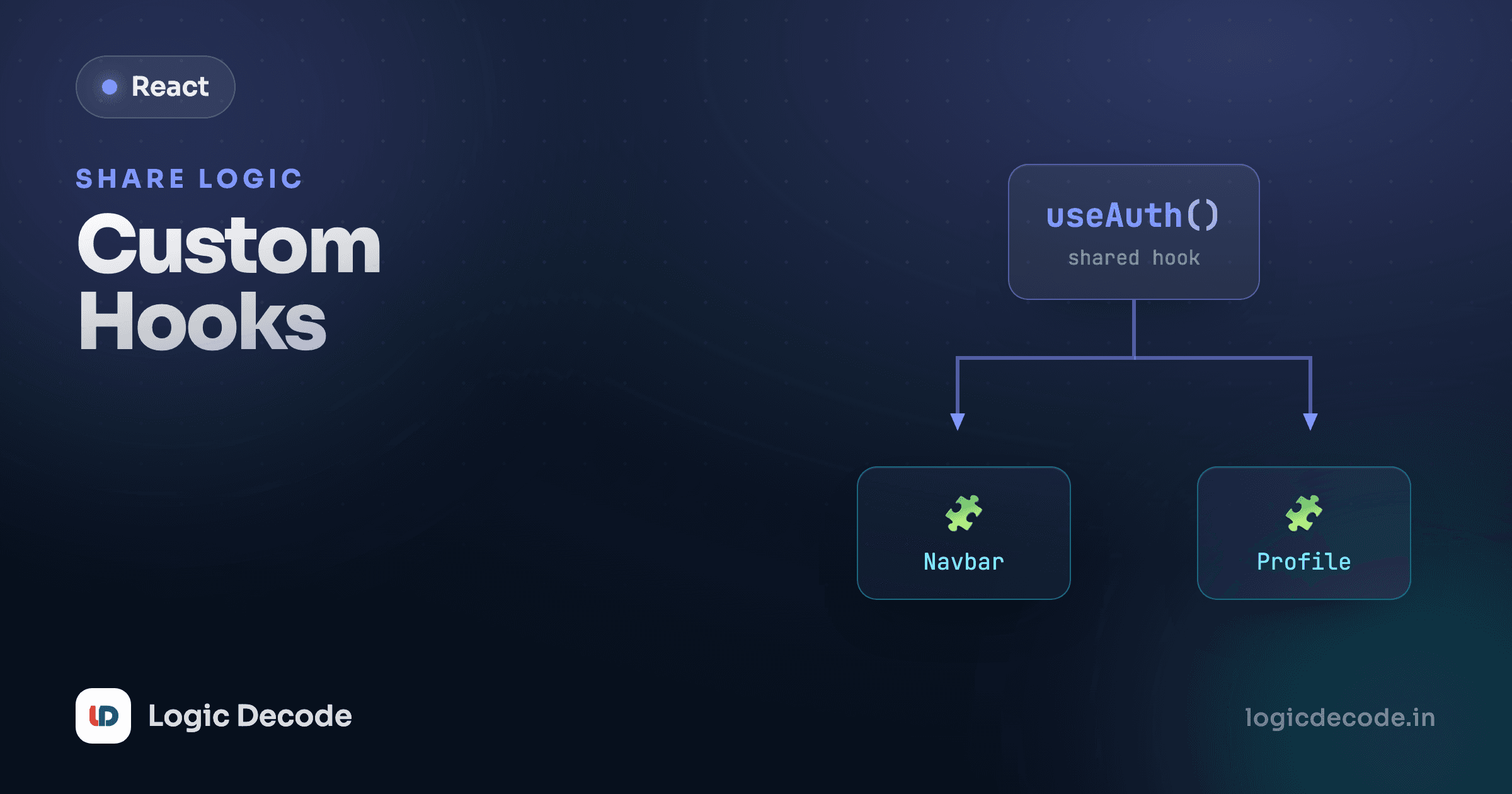
You've got two components that both track a true/false toggle. Same useState, same flip function, copy-pasted. Then a third needs it. The instinct is to make a component to share the logic, but the logic isn't UI, it's behavior. A custom hook is how you pull that shared behavior out into one named function and call it from anywhere.
Why custom hooks exist
A regular function lets you reuse plain logic: math, string formatting, whatever. But the moment your logic touches useState or useEffect, a plain function won't do, because those can only run inside a component or another hook. A custom hook is just a function that is allowed to call other hooks. That's the whole idea: it's a function you can stuff state and effects into, then reuse.
The key distinction: a component returns UI (JSX), a custom hook returns data and functions. Same building blocks underneath, different job. When you find yourself copying the same useState + handler pair into multiple components, that's the signal to extract a hook.
Here are two counters living in one file, sharing nothing. Notice how much is duplicated.
The state and the increment handler are identical in both. That's the duplication a custom hook removes.
Build your first custom hook
A custom hook is a function whose name starts with use. That naming isn't decoration. React's linter uses the use prefix to know it should apply the rules of hooks to it. Inside, you call regular hooks like useState, then return whatever the caller needs.
Let's extract a useCounter. It owns the state and the bump function, and hands both back.
Now the counter logic lives in one place. Likes starts at 0, Views starts at 10 and gets a reset button, the same hook configured per use. And here's the part that surprises people: each call to useCounter gets its own independent state. Likes clicking up doesn't touch Views. A custom hook shares the logic, not the data. Every component that calls it gets a fresh, isolated copy of whatever state is inside.
Return shape is your choice
useState returns an array so you can rename freely with destructuring. For a hook with two values, an array works. For three or more, an object (like useCounter above) reads better. const { count, reset } = useCounter() says what each thing is, and the caller can grab only what they need.
The rules of hooks
Hooks, built-in or custom, come with three rules. Break them and you get bugs that are maddening to track down, which is exactly why the linter enforces them.
- Only call hooks at the top level. Never inside an
if, a loop, or a nested function. React tracks hooks by call order, so the same hooks have to run in the same sequence on every render. A conditionaluseStatewould shift everything after it out of place. - Only call hooks from React functions: a component, or another custom hook. Plain functions and event handlers can't call them.
- Name custom hooks
use…so React and the linter treat them as hooks.
The first one trips up everyone. If you need conditional behavior, put the condition inside the hook call, not around it:
function Profile({ userId }) {
  // ❌ Wrong — hook inside a condition
  if (userId) {
    const [data, setData] = useState(null);
  }

  // ✅ Right — hook always runs, condition lives inside
  const [data, setData] = useState(null);
  if (userId) {
    // ...use setData here
  }
}
Quick check
Why must hooks be called at the top level, never inside an if or loop?
A useful one: useLocalStorage
useCounter shows the shape, but the real win is wrapping awkward logic so callers never see it. localStorage is a good example. Saving and reading values means string parsing, JSON calls, and a try/catch for the read. Hide all of that behind a hook that works exactly like useState, except the value survives a page reload.
The hook reads the saved value once on first render (the lazy initializer, passing a function to useState so it only runs once), then writes back to localStorage whenever the value changes via useEffect.
Run it, type a name, flip the theme, then hit reload on the preview pane, and both come back. The component using it has no idea localStorage is involved. It calls useLocalStorage("name", "") and gets back a [value, setValue] pair that looks and behaves like ordinary useState. That's the goal of a good custom hook: the messy part is sealed inside, and the call site stays clean.
Notice it returns an array [value, setValue] on purpose, mirroring useState's shape so it's a drop-in swap. Change useState to useLocalStorage in an existing component, add a key, and the value starts persisting. Nothing else changes.
Same key, separate state
Two components calling useLocalStorage("name", "") each keep their own React state, even though they share a storage key. Update one and the other won't re-render to match until its own next render. For genuinely shared, always-in-sync state across the tree, you want React Context, the next lesson.
When to reach for one
Don't extract a hook on day one. Write the logic inline first. When you catch yourself copying the same stateful pattern into a second or third component, that's the moment. Pull it into a use… function and call it from each spot. The bar is reuse of behavior, not UI. If you want to reuse markup, that's a component, not a hook.
A lot of the hooks you'd write have already been written well. Before rolling your own useLocalStorage, useDebounce, or useMediaQuery, it's worth checking a maintained collection. The patterns are also worth reading even if you never install them. They're a masterclass in clean hook design.
Recap and what's next
A custom hook is a function named use… that calls other hooks, lets you reuse stateful logic across components, and returns data and functions instead of UI. Each call gets its own isolated state, so the logic is shared but the values aren't. Follow the rules of hooks (top level only, React functions only, use prefix) and let the linter catch the rest. Start inline, extract when you hit real duplication, and check React's own guide to reusing logic with custom hooks for the deeper patterns.
This built on Fetching data, where the useEffect + state pattern we just wrapped first showed up. Next we tackle sharing state across many components without threading props through every level: React Context.

Written by
Rhythm Bhiwani
Engineer and relentless builder, happiest reverse-engineering hard problems until they click.
Enjoyed this?
Tap the heart to leave some love.
Be the first to react
Comments
Join the conversation.
Loading comments…