WebMCP in Chrome: Your Site as a Tool for AI Agents
Chrome 149 is trialing WebMCP, letting your site expose real tools to AI agents instead of getting scraped. The API, the security model, and the catch.

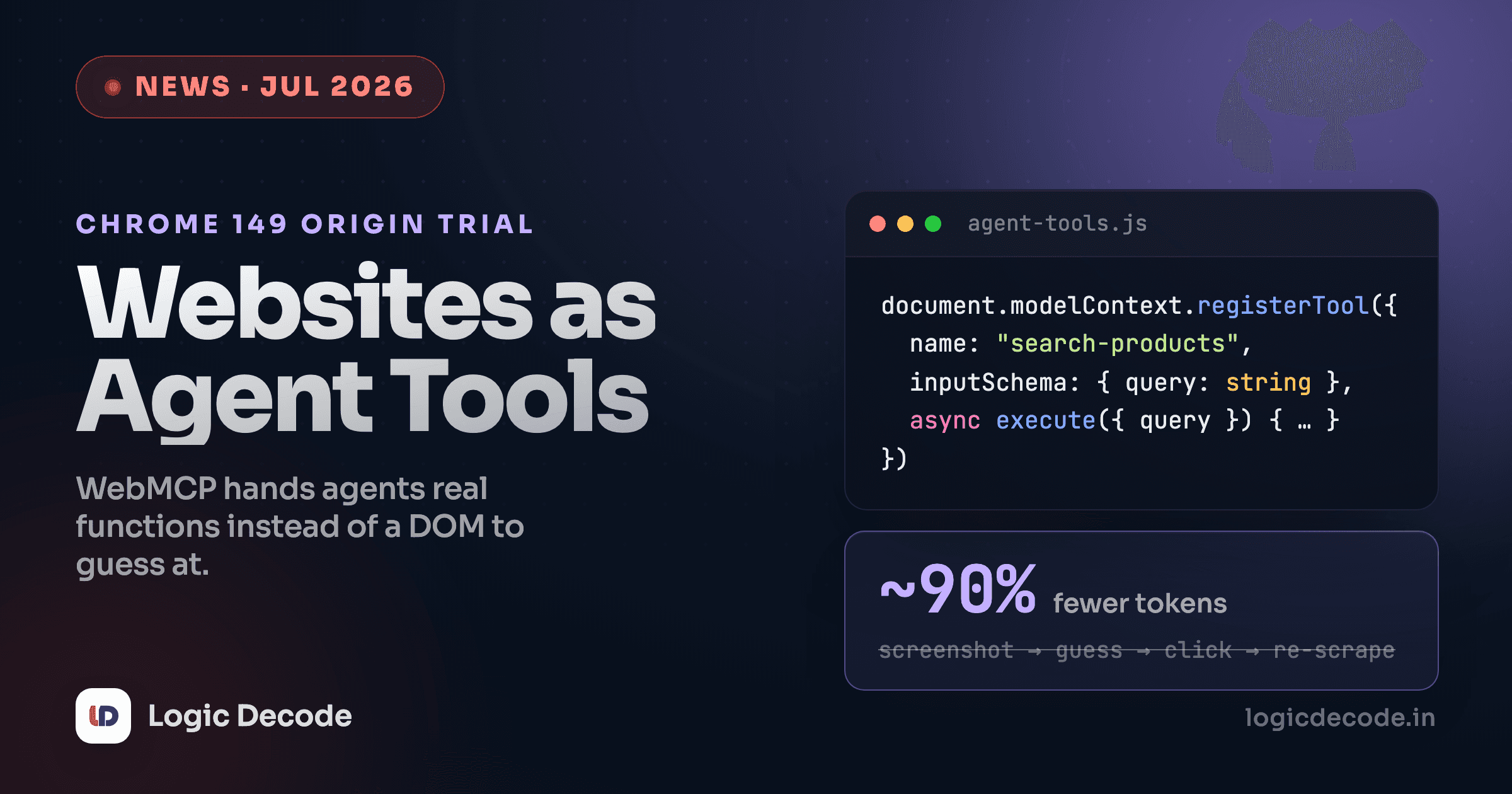
Right now, when an AI agent visits your site, it squints at it. It screenshots the page, reads DOM nodes, guesses which div is the search box, plans a click sequence, and hopes nothing moved since the last frame. It's slow, it burns tokens, and it breaks the moment you ship a redesign.
WebMCP is a bet on the opposite approach. Instead of letting agents guess, your site hands them a list of functions and says: here's what you can do, here are the arguments, call one.
Google put it into an origin trial in Chrome 149, and Microsoft is co-developing the spec through the W3C Web Machine Learning community group. It's a genuinely good idea. It also has close to zero real-world adoption, and the reason why is more interesting than the API.
What WebMCP actually does
If you've wired up tool calling for an LLM before, the shape will feel familiar. WebMCP takes the same idea and moves it into the page, so an in-browser agent can call your JavaScript directly.
Tools get registered on document.modelContext:
const controller = new AbortController();

await document.modelContext.registerTool({
  name: "search-products",
  description: "Search the catalogue and return matching products",
  inputSchema: {
    type: "object",
    properties: {
      query: { type: "string", description: "Free text search terms" },
      maxPrice: { type: "number", description: "Upper price limit in INR" },
    },
    required: ["query"],
  },
  async execute({ query, maxPrice }) {
    const results = await searchCatalogue({ query, maxPrice });
    return {
      content: [
        { type: "text", text: `Found ${results.length} products under ${maxPrice}.` },
      ],
    };
  },
}, { signal: controller.signal });
Three things worth noticing. The inputSchema is plain JSON Schema, so the agent gets typed arguments instead of inferring them from placeholder text. The signal handles teardown, so a tool can unregister when a component unmounts. And execute returns a structured content array rather than a rendered page, which is the whole point.
There's a second, lighter path too. The declarative API lets you annotate an existing HTML form with attributes like toolname and tooldescription so the browser exposes it as a tool without you writing any glue. Treat that one as a preview. The forms half of the spec is still marked as unfinished work, even though tooling has started auditing for it.
The payoff is real where it's been measured. One early implementer who built a WebMCP polyfill for Chrome DevTools reported roughly a 90% drop in token usage after replacing the screenshot-and-act loop with tool calls, plus better speed and determinism. That tracks. You're deleting an entire perception step.
Turning it on
The origin trial runs from Chrome 149. Register at Chrome Origin Trials for a token, or skip that for local work and flip chrome://flags/#enable-webmcp-testing.
Two constraints will bite you before anything else does:
- WebMCP only works in origin-isolated documents. If you're still setting
document.domainand sendingOrigin-Agent-Cluster: ?0, the API is off. Legacy subdomain-sharing tricks and WebMCP don't coexist. - Both APIs sit behind a
toolsPermissions Policy that defaults toself. A cross-origin iframe gets nothing unless you addallow="tools".
Also worth knowing before you plan an architecture around it: tool calls run in JavaScript, so a tab or webview has to be open. There's no headless mode. This is not a replacement for a server-side API.
The namespace already moved once
Earlier examples used navigator.modelContext. The current explainer uses document.modelContext. If you're reading a tutorial written a few months ago, check which one it uses before debugging why nothing registers.
The security model deserves a slow read
Your tools run with the user's session privileges. An agent calling delete-account is indistinguishable, from your server's point of view, from the user clicking the button. That's the same trust problem MCP has on the server side, except now it's sitting inside an authenticated browser tab.
The spec gives you two hints to pass along. Mark non-mutating tools with readOnlyHint so an agent knows a call is safe to retry or speculate on. Mark data that came from outside your trust boundary with untrustedContentHint, which matters a lot if a tool returns user reviews, comments, or anything else a stranger wrote.
Those are hints. They are not enforcement. A model that's been talked into something by injected text will happily call a legitimate tool for an illegitimate reason, which is the confused-deputy problem wearing a new hat. If your tool moves money, deletes data, or changes permissions, put a real confirmation in front of it rather than trusting a flag. We went deeper on this failure mode in Prompt Injection: The #1 Security Risk for AI Apps, and every bit of it applies here.
Design tools the way you'd design a public API for a client you don't control. Narrow scope, validated inputs, no ambient authority, and an audit trail.
The part nobody puts in the announcement
Here's where I'd push back on the excitement.
WebMCP has a supply side and no demand side. Chrome ships the infrastructure. Expedia, Booking.com, Shopify, Credit Karma, and Target have run pilots. Independent audits in July found essentially no mainstream agent actually calling these tools. ChatGPT, Claude, and Perplexity are all still scraping pages the old way. Gemini integration in Chrome is promised, not shipped.
That's a two-sided bootstrap problem, and it's the hardest kind of standard to launch. Sites won't spend a sprint exposing tools nobody calls. Agents won't build consumption for tools nobody exposes. Adding to the pile: Firefox and Safari are uncommitted observers, the declarative forms half is unfinished, and the API namespace already shifted once mid-trial.
So no, this isn't the moment to rewrite your product around WebMCP.
It might be the moment to spend an afternoon on it, and that's a different claim. The work is small and mostly reusable. Writing a JSON Schema for your three most valuable actions is useful whether the caller ends up being WebMCP, a server-side MCP endpoint, or your own agent. If you already expose tools to an LLM, you've done most of it. LLM Tool Calling covers that groundwork, and Build an LLM Agent walks through the consuming side.
A cheap way to place a bet
Pick the two or three actions users most often come to your site to perform. Search, filter, add to cart, check status. Write the schemas, register the tools, and put them behind a flag. If agent traffic shows up, you're ready. If it doesn't, you've still got clean, documented, typed entry points to your own app.
Who should care right now
Worth your time if you run a site where agents plausibly transact soon, meaning travel, retail, ticketing, banking dashboards, or support portals. Those are exactly the pilots already running, and being early is cheap.
Worth watching if you build a framework, a component library, or dev tooling. The integration points are still being decided, and 102 open issues on the explainer means the design is genuinely unsettled.
Safe to ignore for now if you run a blog, a docs site, or anything where the useful agent action is "read the page." Agents are already fine at reading. WebMCP is about doing.
Quick check
Why does WebMCP cut token usage so sharply compared to how agents browse today?
The bottom line
WebMCP is the right shape for a real problem. Agents scraping UIs is wasteful and brittle, and letting sites declare their own capabilities is obviously better than making every agent reverse-engineer a checkout flow.
Whether it becomes the standard is a separate question from whether it's a good design, and that question gets answered by whichever agent vendor decides to consume it first. Until one does, this is infrastructure waiting for traffic.
Read the explainer and the Chrome docs, register a couple of tools, and keep the schemas. The schemas are the durable part. The transport can change.

Written by
Rhythm Bhiwani
Engineer and relentless builder, happiest reverse-engineering hard problems until they click.
Enjoyed this?
Tap the heart to leave some love.
Be the first to react
Comments
Join the conversation.
Loading comments…