Docker Environment Variables and Networking
Configure containers with environment variables, and let them talk to each other: Docker networks, container DNS by name, and connecting an app to a database.

Two things separate a toy container from one that actually runs an app: telling it how to behave, and letting it talk to other containers. The first is environment variables. The second is networking. Get these two right and you can stand up an app and its database on your laptop with two commands, no localhost gymnastics, no hard-coded passwords baked into an image.
Configuring a container with environment variables
Most real software reads its config from environment variables: which port to listen on, which mode to run in, where the database lives. The image stays the same. You change behaviour at run time by passing different values in. That's the -e flag (short for --env).
docker run -e APP_ENV=production -e PORT=8080 my-appInside the container, APP_ENV is production and PORT is 8080. Run the same image again with -e APP_ENV=staging and it behaves differently: one image, many configurations. Want proof the value made it through? Spin up a plain Linux container and print it:
docker run -e GREETING="hello from outside" alpine envenv dumps every variable the container can see, and your GREETING is in the list. That's the whole mechanism: you set values on the outside, the process reads them on the inside.
Loading many variables from a file
Typing ten -e flags gets old, and worse, the values end up in your shell history. Put them in a file instead and point Docker at it with --env-file:
APP_ENV=production
PORT=8080
DB_HOST=db
DB_USER=appuser
DB_PASSWORD=supersecretdocker run --env-file .env my-appSame result, far less typing, and the file is easy to keep out of version control. One gotcha: the .env format here is plain KEY=value lines, no quotes needed, no spaces around the =. It is not a shell script, so DB_HOST=$OTHER won't expand anything.
Never bake secrets into the image
Do not put passwords, API keys, or tokens in your Dockerfile with ENV DB_PASSWORD=.... Anyone who pulls the image can read every layer with docker history and recover them. The image is not a vault, it's a public-ish archive. Secrets belong at run time, passed in with -e or --env-file (and the file stays in .gitignore). Use ENV only for non-secret defaults like PORT or NODE_ENV.
Why one container can't reach another by localhost
Here's the trap that catches everyone. Your app container connects to a database at localhost:5432, it worked when both ran on your laptop, and inside Docker it suddenly can't find the database. Why?
Because inside a container, localhost means this container, not your machine, and definitely not some other container. Each container gets its own isolated network namespace. The app's localhost is a tiny private world with nothing but the app in it. The database is over in its own world. They're neighbours who can't hear each other through the wall.
So how do they talk? Through a Docker network they both join.
Default bridge vs a user-defined network
Every container is attached to a network. By default it's the built-in bridge network, and on that one, containers can only reach each other by IP address. There's no name resolution. IPs change every time a container restarts, so wiring two services together on the default bridge is miserable.
The fix is a user-defined network. Create one yourself, attach your containers to it, and Docker turns on an embedded DNS server for that network. Now containers find each other by container name. Name a container db and any other container on the same network can connect to the host db. No IPs, no guessing.
docker network create app-netThat's it. You now have a network called app-net. List your networks to see it sitting alongside the built-ins:
docker network lsThe one-line takeaway
On a user-defined network, the container name is the hostname. Run a container with --name db and other containers reach it at db. This is the single most useful thing to remember about Docker networking.
A concrete example: connect an app to a database
Let's wire a Postgres database to an app, the way you actually would. Three commands: make the network, start the database on it, start the app on it.
docker network create app-net

docker run -d \
  --name db \
  --network app-net \
  -e POSTGRES_USER=appuser \
  -e POSTGRES_PASSWORD=supersecret \
  -e POSTGRES_DB=appdb \
  postgres:16
The database container is named db and lives on app-net. Its config (user, password, database name) comes in through environment variables, exactly the pattern from earlier. Now the app, on the same network, told where to find the database:
docker run -d \
  --name web \
  --network app-net \
  -e DB_HOST=db \
  -e DB_PORT=5432 \
  -e DB_USER=appuser \
  -e DB_PASSWORD=supersecret \
  -p 3000:3000 \
  my-app
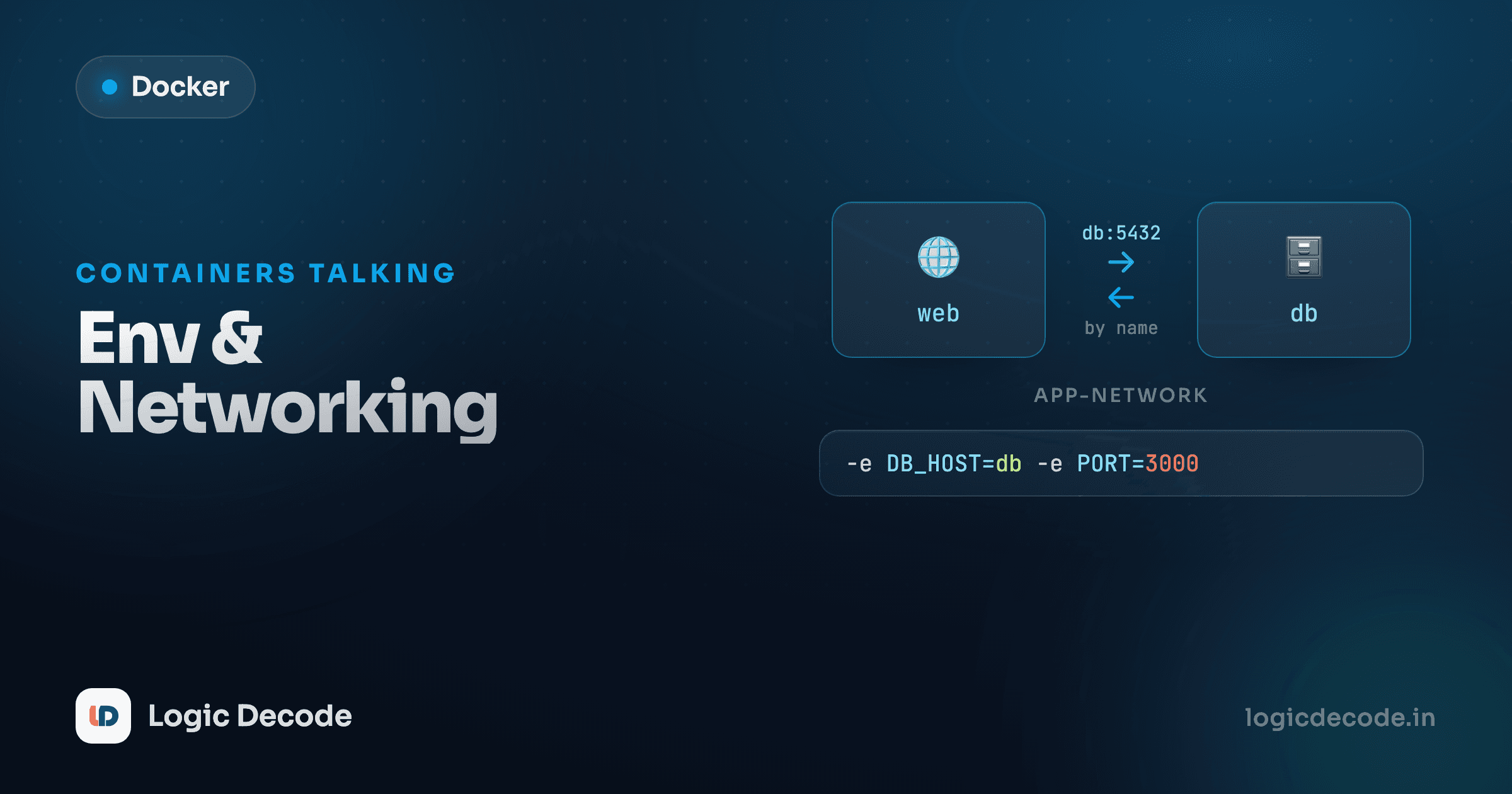
Look at DB_HOST=db. The app connects to the hostname db, Docker's DNS on app-net resolves it to the database container, and the connection just works. The two containers are on the same network, so they speak by name.
Here's the shape of it:
Inside the box, web reaches db by name over the user-defined network. Outside the box, your browser reaches web through a published port. Which brings us to the last piece.
Exposing vs publishing, one more time
These two get muddled constantly, so here's the clean version.
- Exposing a port (the
EXPOSEline in aDockerfile, or--expose) is documentation plus intra-network access. It says "this container listens on this port." Other containers on the same network can reach it, but your host cannot. - Publishing a port (
-p HOST:CONTAINER) punches a hole from your machine into the container.-p 3000:3000means traffic tolocalhost:3000on your laptop is forwarded to port 3000 in the container.
Notice what's missing from the database command above: there's no -p. The db container is never published to your host, and it doesn't need to be. Only the app talks to it, and the app reaches it over app-net by name. Publishing the database would just expose it to the outside world for no reason, so keep it on the private network where it belongs. Publish only what humans need to hit from outside, and let containers reach everything else by name internally.
Quick check
An 'app' container on the user-defined network 'app-net' needs to connect to a Postgres container started with --name db --network app-net. What host should the app use?
Recap and what's next
Configuration comes in through environment variables at run time (-e KEY=value for a few, --env-file for many), and secrets never get baked into the image, only passed in when you run it. Containers can't reach each other over localhost because each one has its own isolated network. Put them on a user-defined network with docker network create and --network, and they find each other by container name through Docker's built-in DNS. That's how an app connects to a db host with no IPs in sight. Publish (-p) only the ports humans hit from outside, and let containers reach the rest by name internally. For the full reference, the Docker networking docs go deep.
You just ran three commands to stand up an app and a database. That's already a lot of typing to remember and repeat. Next we collapse all of it (networks, env vars, names, ports) into a single file you run with one command: Docker Compose. And if you missed how ports and persistent storage work, back up to Ports and volumes.

Written by
Rhythm Bhiwani
Engineer and relentless builder, happiest reverse-engineering hard problems until they click.
Enjoyed this?
Tap the heart to leave some love.
Be the first to react
Comments
Join the conversation.
Loading comments…