Status codes and headers that actually matter
The HTTP status codes worth memorizing (200, 201, 204, 400, 401, 404, 409, 500) and the headers that control caching, content, and auth.

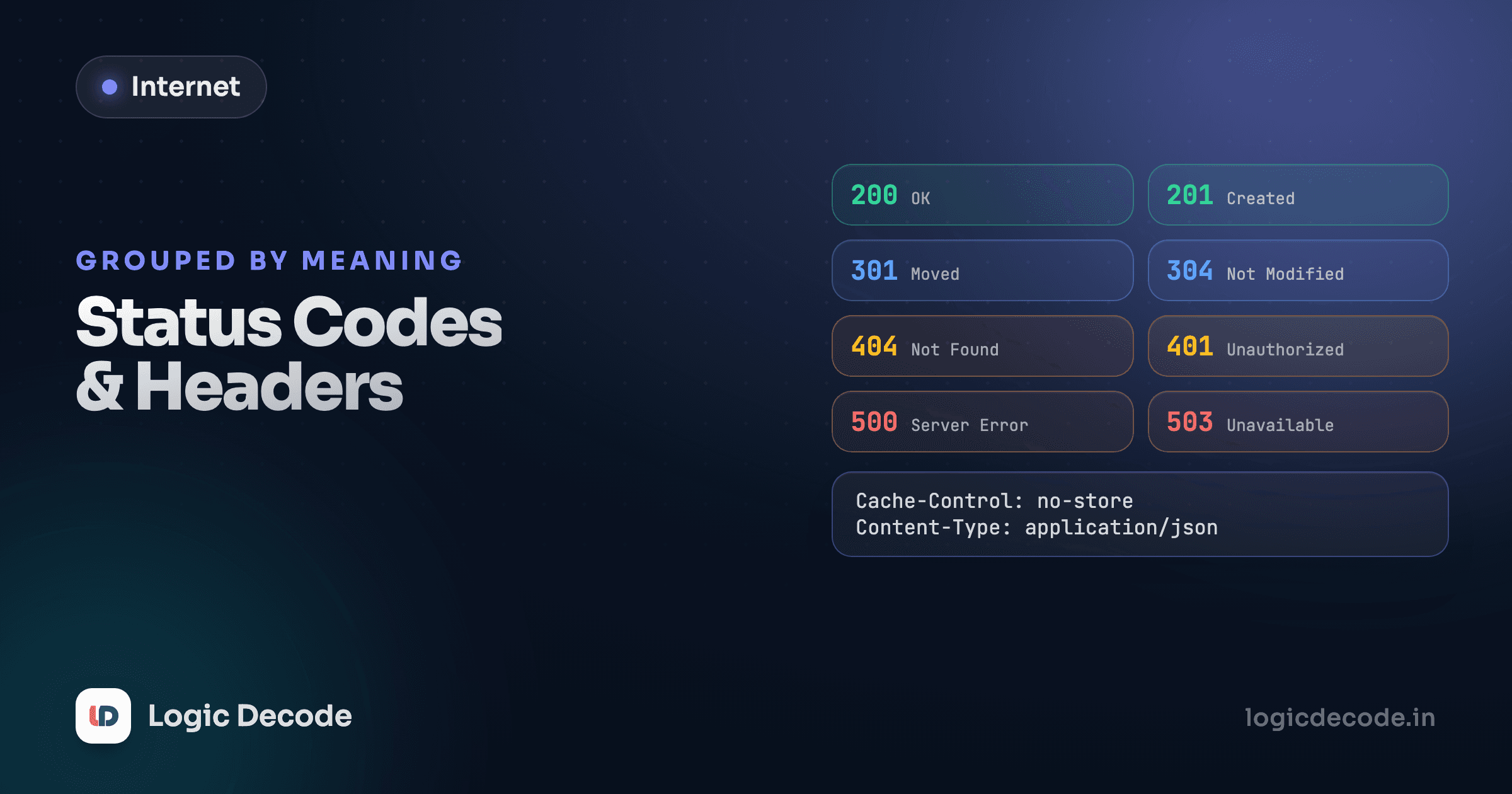
There are over 60 official HTTP status codes. You need about eight of them. The rest are edge cases you'll look up the one time you hit them, or trivia that never comes up in practice. This lesson is the short list, plus the headers that actually change how a request or response behaves, not just the ones that describe it.
The previous lesson covered the shape of a request and response. This one is about reading the two most information-dense parts of that response: the three-digit number at the top, and the headers underneath it.
The status code families
Status codes are grouped by their first digit, and knowing the family alone tells you most of what you need before reading anything else:
- 2xx: it worked. The server did what you asked.
- 4xx: the client got something wrong. Bad request, missing auth, resource doesn't exist.
- 5xx: the server got something wrong. A bug, a crash, something on their side failed.
You don't need to memorize every code in every family. You need the handful that show up constantly.
The eight codes worth knowing cold
200 OK. The generic success. A GET request that found what you asked for returns this.
201 Created. Success, and specifically: a new resource now exists because of this request. A POST that creates a new record should return 201, not 200, so the caller knows something was created rather than just fetched.
204 No Content. Success, but there's nothing to send back. A DELETE request that removed something returns 204: it worked, and there's no body because there's nothing left to describe.
400 Bad Request. The request itself is malformed or fails validation. Malformed JSON, a missing required field, a URL that isn't actually a URL. The client needs to fix the request and try again.
401 Unauthorized. The server doesn't know who you are. Missing or invalid credentials. Confusingly named, since it's really about authentication, not authorization, but the name stuck decades ago and nobody's renaming it now.
404 Not Found. Whatever you asked for doesn't exist, or at least the server isn't telling you whether it does.
409 Conflict. The request is valid, but it collides with the resource's current state. Trying to register an email address that's already taken is a textbook 409: nothing's wrong with the request format, the problem is what already exists on the server.
500 Internal Server Error. Something broke on the server, and it's not the client's fault. A bug, an unhandled exception, a database that's unreachable.
A deliberately missing code
You won't see 405 Method Not Allowed used anywhere in this track. Real APIs use it (wrong HTTP verb for a valid path), but this series and the backend series that follows it standardize on treating an unmatched method as a plain 404, to keep the status code list this series teaches small and consistent. If you build APIs professionally, know that 405 exists. It just isn't part of the core set here.
Try these against a simulated API. Every response here matches the real Linkstash API this whole track is built around, so nothing you learn here contradicts what you'll see in the backend series later:
Notice the third request, DELETE /links/1, comes back 204 with no body at all. That's not a bug in the simulator. A successful delete has nothing left to describe, so an empty body is the correct response, not a lazy one.
Quick check
A user submits a signup form with an email address that's already registered. Which status code fits best?
Headers that change behavior, not just describe it
Some headers are informational, Content-Type tells you what's in the body. Others actually change what happens. A few worth knowing now, with more depth coming in later lessons:
- Cache-Control tells browsers and proxies how long a response can be reused without asking the server again. Lesson 11 covers this in depth, it's most of how CDNs make repeat visits fast.
- Set-Cookie, sent by the server, and Cookie, sent back by the browser on every future request to that domain, are how a site remembers you're logged in between requests that would otherwise be completely stateless. Lesson 9 is entirely about this.
- Access-Control-Allow-Origin shows up when a browser blocks a cross-origin request and you're trying to figure out why. Lesson 10 covers CORS end to end.
- Content-Type on a request tells the server how to parse the body. Get this wrong (send JSON but claim
text/plain) and a well-built server will refuse to parse it, even though the bytes are perfectly valid JSON.
Why the short list is enough
Once these eight codes and this handful of headers are second nature, reading almost any HTTP exchange gets fast. See a 401 and you immediately know: not a bug, an auth problem, check the token. See a 409 and you know: don't retry blindly, something already exists. The status code is doing real communication work, and a server that returns the right one is handing you a diagnosis for free.
The next two lessons zoom into two of the headers mentioned above, cookies and CORS, but first: everything so far assumed the connection itself is private. It usually isn't, unless TLS is involved. On to HTTPS and TLS: how the padlock works.

Written by
Rhythm Bhiwani
Engineer and relentless builder, happiest reverse-engineering hard problems until they click.
Enjoyed this?
Tap the heart to leave some love.
Be the first to react
Comments
Join the conversation.
Loading comments…