Prompt Engineering That Actually Works
Practical prompt engineering for developers: be specific, use few-shot examples, fix the format, and dodge the failure modes that waste tokens.

"Prompt engineering" sounds like a dark art with secret incantations. It isn't. It's the boring, learnable skill of telling the model exactly what you want, in a shape it can act on. Most "bad" model output isn't the model being dumb. It's a vague request getting a vague answer. Tighten the ask and the same model, the same parameters, suddenly looks twice as smart.
Vague in, vague out
You met the message format in the last lesson. Same setup here. The change is what goes in content.
Watch one task two ways. You want a one-line product blurb for a pair of headphones.
from openai import OpenAI
import os

client = OpenAI(base_url=os.environ["LLM_BASE_URL"], api_key=os.environ["LLM_API_KEY"])
MODEL = os.environ.get("LLM_MODEL", "gpt-4o-mini")

resp = client.chat.completions.create(
    model=MODEL,
    messages=[
        {"role": "user", "content": "Write a description for my headphones."},
    ],
)
print(resp.choices[0].message.content)
# -> three rambling paragraphs of "immersive soundscapes" and
#    "elevate your listening journey". Wrong length, wrong tone, useless.
Nothing about the model changed between those two tabs. The second one wins because it answers four questions the first one left open: who's writing (system message), what exactly (product, with specs), how long and in what format (one sentence, under 20 words), and what to avoid (no hype, no exclamation marks). That's the whole game in one example.
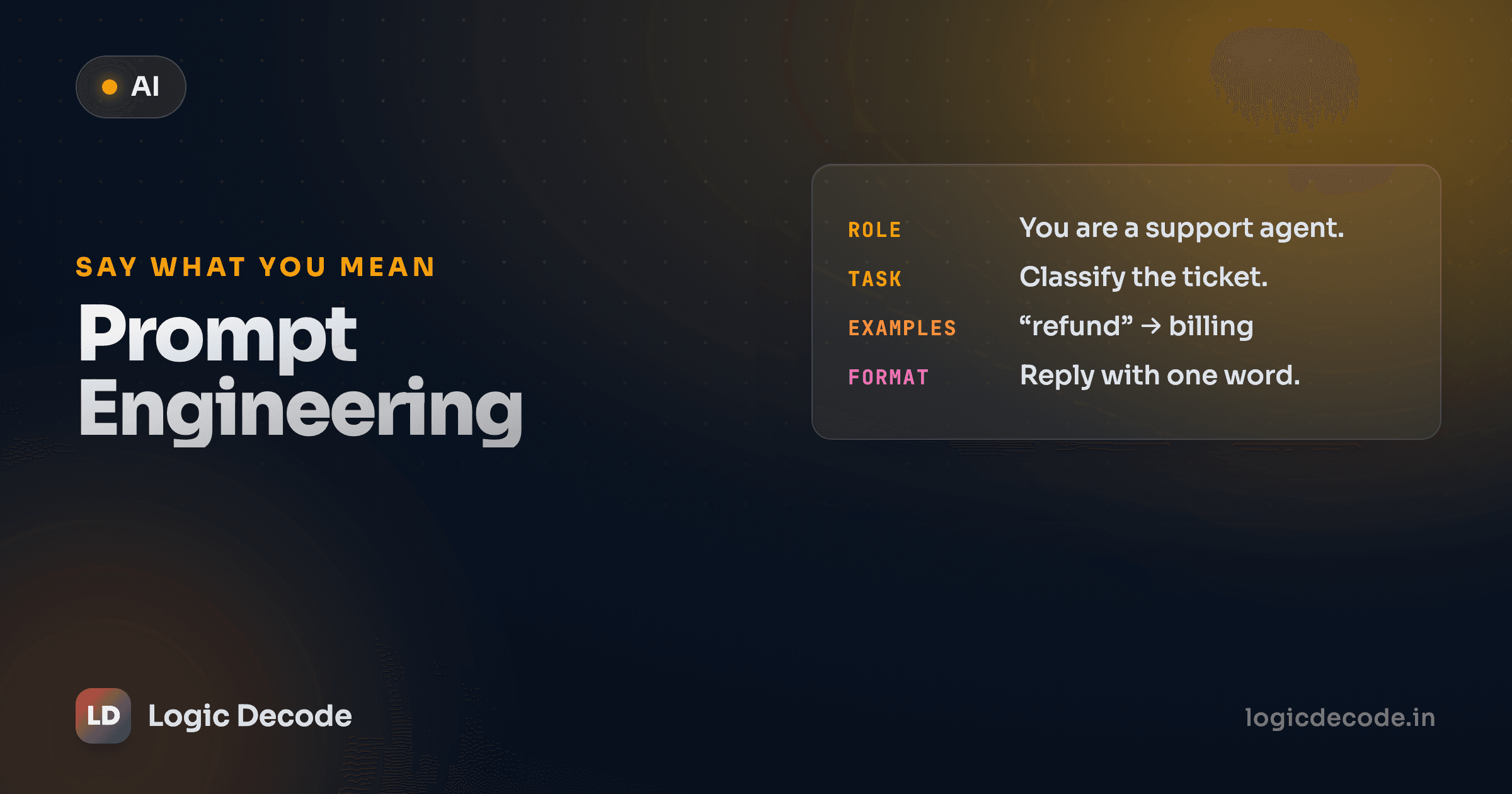
The four levers: role, task, constraints, format
When a prompt underperforms, it's almost always missing one of these. Run down the list:
- Role: who is the model being right now? "A senior security reviewer," "a friendly support agent," "a strict JSON formatter." This sets vocabulary and judgment. Put it in the
systemmessage. - Task: the actual job, stated as an instruction, with the real input attached. Not "help me with this email," but "rewrite this email to sound less aggressive," followed by the email.
- Constraints: length, tone, what to include, what to refuse. "Under 50 words." "Don't invent prices." "If the text doesn't mention a date, say 'unknown'."
- Format: the exact shape of the output. "Reply with only the corrected code, no explanation." "Return three bullet points." A loose format spec is the single biggest cause of output you can't use in a program.
You don't need all four every time. A throwaway question needs none. But the moment the output feeds into other code, every missing lever is a place the model gets to improvise, and it will.
Rule of thumb
If you can't predict the shape of a good answer before you read it, the model can't either. Pin down length and format first, tone and cleverness second.
Few-shot: show, don't just tell
Instructions describe what you want. Examples demonstrate it, and the model is far better at pattern-matching than at parsing prose rules. "Few-shot" prompting just means you include a handful of input→output examples before the real input. The teaser at the end of the last lesson (seeding assistant messages yourself) is exactly this.
The trick: each example is a user message (the input) paired with an assistant message (the ideal output). The model reads them as a conversation that already happened and continues the pattern.
Say you're tagging the sentiment of short messages and you need one word, lowercase, every time.
from openai import OpenAI
import os

client = OpenAI(base_url=os.environ["LLM_BASE_URL"], api_key=os.environ["LLM_API_KEY"])
MODEL = os.environ.get("LLM_MODEL", "gpt-4o-mini")

messages = [
    {"role": "system", "content": "Classify sentiment as exactly one of: positive, negative, neutral. Reply with the single word only."},
    # --- few-shot examples: input, then the ideal output ---
    {"role": "user", "content": "The delivery was two days late and nobody told me."},
    {"role": "assistant", "content": "negative"},
    {"role": "user", "content": "Package arrived, works as described."},
    {"role": "assistant", "content": "neutral"},
    {"role": "user", "content": "Absolutely love it, best purchase this year!"},
    {"role": "assistant", "content": "positive"},
    # --- the real input ---
    {"role": "user", "content": "It's fine I guess, does the job."},
]

resp = client.chat.completions.create(model=MODEL, messages=messages)
print(resp.choices[0].message.content)
# -> "neutral"
Three examples did what a paragraph of rules struggles to: they fixed the output to one lowercase word from a closed set. No "Sentiment: Neutral 😊", no "This message seems neutral because…". The model copied the shape it saw.
A few things that matter with few-shot:
- One to three examples is usually plenty. Past that you're mostly spending tokens. Add more only if a specific edge case keeps slipping.
- Cover your edge cases on purpose. If sarcasm or mixed sentiment trips it up, make one example a sarcastic line. Examples are how you patch behavior without rewriting instructions.
- Keep examples consistent. If one example replies
positiveand another repliesPositive., you've taught it to be inconsistent. The model matches what you show, warts and all.
Quick check
You want an LLM to always reply with a single lowercase label from a fixed set, and instructions alone keep giving you stray punctuation and capitalization. What's the most reliable fix?
Give it room to think, briefly
For anything with reasoning (a math word problem, a tricky classification, debugging), the worst thing you can do is demand the final answer first. Models commit to whatever they say first, so if the answer comes before the reasoning, the reasoning becomes an after-the-fact excuse. Ask for the work, then the answer.
resp = client.chat.completions.create(
    model=MODEL,
    messages=[
        {"role": "system", "content": "Work through the problem in 2-3 short steps, then give the final answer on its own last line prefixed with 'Answer:'."},
        {"role": "user", "content": "A shop sells pens at 12 for 90 rupees. Aarav buys 30 pens. How much does he pay?"},
    ],
)
print(resp.choices[0].message.content)
# -> Step 1: One pen costs 90 / 12 = 7.5 rupees.
#    Step 2: 30 pens cost 30 * 7.5 = 225 rupees.
#    Answer: 225 rupees
Two caveats. Keep it bounded: "2-3 short steps," not "think deeply about every angle," or you'll pay for a wall of text. And if you only need the number, ask the model to reason and then you parse the last line. For genuinely hard reasoning there are dedicated "reasoning" models that do this internally, but the prompt-level version above works on any model and costs you nothing to try.
The failure modes (and how to fix them)
These four account for most bad output. The fix is never "add more adjectives."
Vague asks. "Make this better." Better how? Shorter, friendlier, more formal? Name the dimension. The model can't read your mind, and it'll optimize for the wrong thing every time.
Too many jobs in one prompt. Ask it to "summarize this, translate it to Hindi, fix the grammar, and list the action items," and the model will do some of it, half of the rest, and quietly drop one. Split it into separate calls, or at least a numbered list of distinct steps. One prompt, one clear deliverable.
No format spec. You ask for "the data" and get a friendly paragraph you can't parse. If a program reads the output, say so: "Return only valid JSON, no prose." We'll make that bulletproof in the structured JSON output lesson.
Assuming it knows your context. The model has never seen your codebase, your product, or your customer. It knows nothing about "the usual format" or "our standard tone." If a fact matters, put it in the prompt. "It keeps getting the company name wrong" usually means the company name was never in the messages.
When something's off, resist the urge to randomly reword. Iterate like a debugger: change one thing, rerun, see if it moved the needle. Add a constraint. Add an example. Move a rule from user to system. Tweaking five things at once and getting a better answer teaches you nothing about which tweak helped.
A worked example: triaging support tickets
Here's the whole toolkit on one realistic job. Maya runs support and wants incoming tickets sorted into a category and a priority, in a fixed format her script can read. Role, constraints, format, and few-shot, all together.
from openai import OpenAI
import os

client = OpenAI(base_url=os.environ["LLM_BASE_URL"], api_key=os.environ["LLM_API_KEY"])
MODEL = os.environ.get("LLM_MODEL", "gpt-4o-mini")

SYSTEM = """You are a support triage assistant.
Classify each ticket into category (billing, bug, feature_request, account) and
priority (low, medium, high). Reply on one line as: category | priority
Use 'high' only when a user is blocked or losing money. Nothing else in the reply."""

def triage(ticket: str) -> str:
    messages = [
        {"role": "system", "content": SYSTEM},
        # few-shot: one example per category to lock the format and the judgment
        {"role": "user", "content": "I was charged twice for last month's plan."},
        {"role": "assistant", "content": "billing | high"},
        {"role": "user", "content": "The export button does nothing in Safari."},
        {"role": "assistant", "content": "bug | medium"},
        {"role": "user", "content": "Could you add dark mode to the dashboard?"},
        {"role": "assistant", "content": "feature_request | low"},
        # the real ticket
        {"role": "user", "content": ticket},
    ]
    resp = client.chat.completions.create(model=MODEL, messages=messages)
    return resp.choices[0].message.content.strip()

print(triage("I can't log in at all and our whole team is locked out."))
# -> "account | high"
Notice what each piece is doing. The system message owns the durable rules and the format. That's the function-style separation of "set once, reuse." The few-shot examples teach the categories and the priority judgment (a double charge is high, a feature request is low) in a way no rule list captures cleanly. And wrapping it in a triage() function means every ticket gets the identical, tested prompt, with no copy-paste drift.
When a ticket gets miscategorized, and some will, you don't rewrite the system prompt in a panic. You add one example that looks like the miss. That's methodical iteration: the prompt gets better one labelled edge case at a time, and you can see exactly why each example is there.
Recap and what's next
Good prompting is specificity, not magic words. Set the role, state the task with its real input, pin the constraints, and lock the format. And when prose isn't enough, show the model one to three input→output examples instead of describing them. For reasoning, ask for brief steps before the answer. And when output's wrong, change one thing at a time like you're debugging, instead of rerolling and hoping.
You can now make the model do the right task in the right shape. Next we control how it generates: temperature, max tokens, and streaming, the dials that decide whether the same prompt comes back focused or wildly creative. If you want to go deeper on technique, OpenAI's prompt engineering guide and the community Prompting Guide are both solid, provider-neutral references.

Written by
Rhythm Bhiwani
Engineer and relentless builder, happiest reverse-engineering hard problems until they click.
Enjoyed this?
Tap the heart to leave some love.
Be the first to react
Comments
Join the conversation.
Loading comments…