RAG: Chat With Your Own Documents in Python
Build retrieval-augmented generation in Python: chunk, embed, retrieve, and ground an LLM's answers in your own documents with a working mini-RAG.

Ask a model about your company's refund policy and it'll answer with total confidence, and total fiction. It has never seen your policy. It's filling the gap with the most plausible-sounding sentence it can generate, which is a different thing from the truth. The fix isn't a smarter model. It's giving the model the right text before you ask the question, and telling it to answer from that text alone. That's RAG, and by the end of this lesson you'll have a small working one in Python.
Why RAG exists
A model knows what was in its training data and nothing else. Your internal docs, last week's meeting notes, the PDF a customer just uploaded: all invisible to it. So when you ask, it guesses. Sometimes the guess is right. Often it's a confident hallucination, which is worse than "I don't know" because it looks like an answer.
Retrieval-augmented generation flips the order. Instead of ask, then hope, you go find the relevant text, then ask. You search your own documents for passages related to the question, paste those passages into the prompt, and instruct the model to answer using only what you handed it. The model stops being a know-it-all and becomes a careful reader of the notes in front of it. Grounded answers, far fewer made-up ones, and (bonus) you can show which passage the answer came from.
The retrieval half is just embeddings and semantic search from the last lesson, put to work. If "embed text into a vector, compare vectors by cosine similarity" sounds fuzzy, read that one first. RAG is what you build with it.
The pipeline, end to end
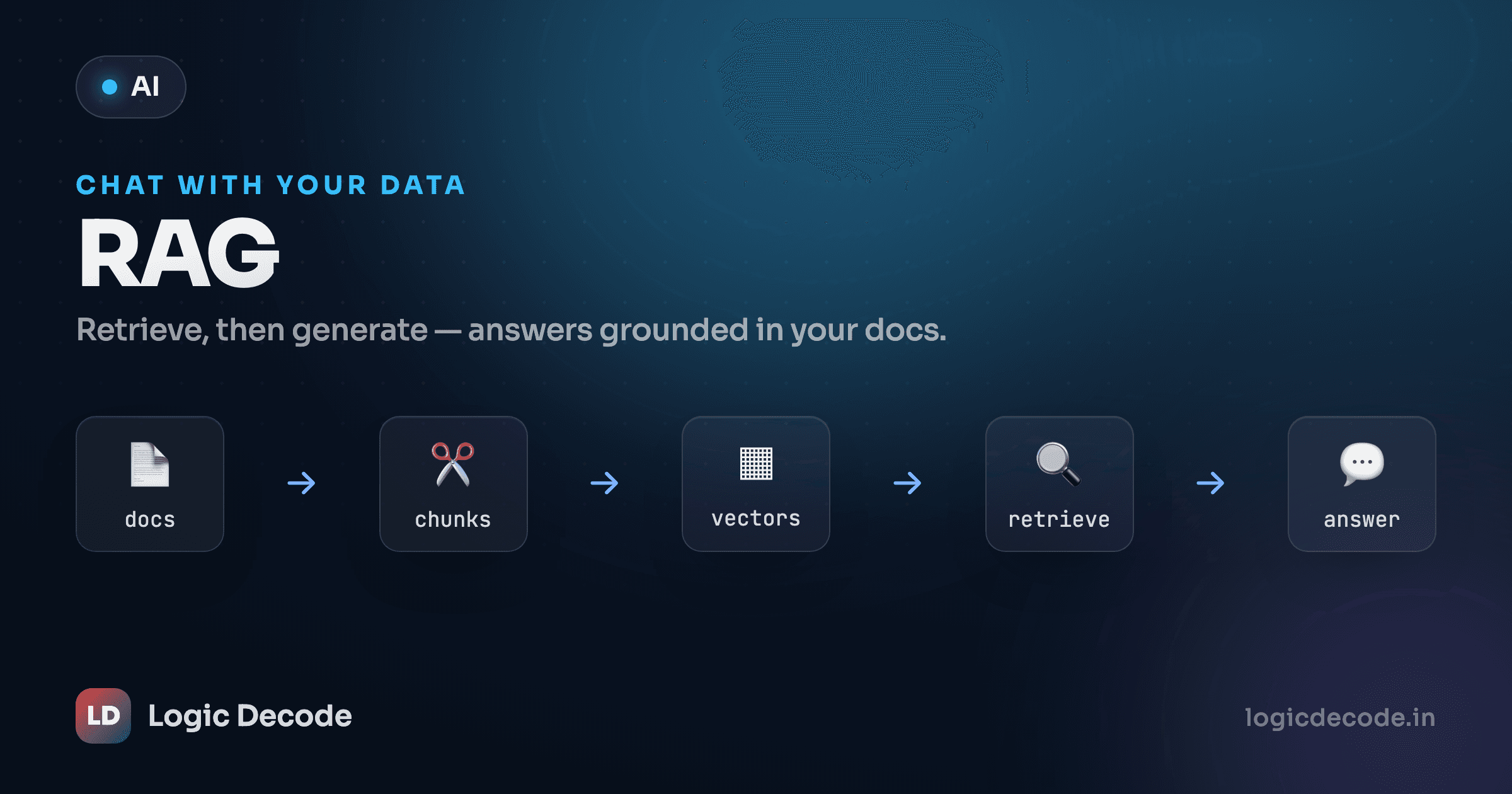
RAG is a pipeline, not a single call. Two phases: one you run once to prepare your documents, and one you run on every question.
Walk it once in words:
- Chunk your documents into small passages. A whole 40-page PDF won't fit in a prompt, and even if it did, burying one relevant sentence in 40 pages of noise wrecks the answer.
- Embed each chunk into a vector with an embedding model. This happens once, up front.
- Store the vectors. For a demo that's a Python list. For real scale it's a vector database, more on that at the end.
- On a question, embed the query with the same model.
- Retrieve the top-k chunks by cosine similarity to the query vector. These are the passages most likely to contain the answer.
- Stuff those chunks into the prompt as context, alongside the question.
- Generate the answer, with an instruction to use only the supplied context, and to say so when the answer isn't there.
Everything below is these seven steps in code.
Step 1: chunk the text (no key needed)
Chunking is plain string work (no model, no key) so you can run it right here. The idea: split text into overlapping windows of words. Overlap matters, because a fact that straddles a chunk boundary would otherwise get cut in half and lost.
Run it and read the output. Each chunk is a short window, and consecutive chunks share a few words at the seam. That's the overlap doing its job. Tweak size and overlap and watch the chunks change. Real chunkers split on sentences or tokens instead of raw words, but the shape is exactly this: small, overlapping pieces.
Chunk size is the dial that matters most
Too big and each chunk dilutes the relevant sentence with noise, so retrieval and the model both get sloppy. Too small and you slice facts apart. A chunk that says "need a manager approval" without "refunds over 500 rupees" is useless. There's no universal number. A few hundred words with ~10–20% overlap is a sane starting point, and you tune it by looking at what actually gets retrieved for real questions. Bad chunking is the most common reason a RAG app gives mediocre answers.
Step 2: set up the client and embed
From here we need an embedding model, which means API calls and a key, so this runs locally, not in the browser. We reuse the exact client from your first API call, plus one new env var for the embedding model.
import os
from dotenv import load_dotenv
from openai import OpenAI

load_dotenv()

client = OpenAI(
    base_url=os.environ["LLM_BASE_URL"],
    api_key=os.environ["LLM_API_KEY"],
)
MODEL = os.environ.get("LLM_MODEL", "gpt-4o-mini")
EMBED_MODEL = os.environ.get("LLM_EMBED_MODEL", "text-embedding-3-small")


def embed(texts):
    resp = client.embeddings.create(model=EMBED_MODEL, input=texts)
    return [d.embedding for d in resp.data]
embed takes a list of strings and returns a list of vectors. Batching is cheaper and faster than one call per chunk. The shape resp.data → [d.embedding for d in resp.data] is the same one from the embeddings lesson. Critical rule: the chunks and the query must go through the same embedding model, or their vectors live in different spaces and similarity is meaningless.
Step 3: build the index
Indexing is "embed every chunk, keep the vectors next to their text." For a demo, a list of (chunk_text, vector) pairs is genuinely all you need.
DOCS = [
    "Maya joined the platform team in March and owns the billing service.",
    "For urgent billing incidents, page the on-call engineer in the platform channel.",
    "Refunds over 500 rupees need a manager's approval before they are issued.",
    "The nightly export job runs at 2 AM IST and writes a CSV to the reports bucket.",
    "Annual leave requests go through the HR portal at least two weeks in advance.",
]

# Embed once, keep vectors beside their text. This is the "index".
INDEX = list(zip(DOCS, embed(DOCS)))
In a real app DOCS would be the chunks from step 1, run over your actual files. Here they're already bite-sized notes, so we embed them directly. INDEX now holds each note paired with its vector, ready to search.
Step 4: retrieve the top-k chunks
To answer a question, embed it and compare its vector against every stored vector with cosine similarity, the same measure from the previous lesson. Highest similarity wins.
import math


def cosine(a, b):
    dot = sum(x * y for x, y in zip(a, b))
    na = math.sqrt(sum(x * x for x in a))
    nb = math.sqrt(sum(y * y for y in b))
    return dot / (na * nb)


def retrieve(question, k=2):
    q_vec = embed([question])[0]
    scored = [(cosine(q_vec, vec), text) for text, vec in INDEX]
    scored.sort(reverse=True)        # highest similarity first
    return [text for _score, text in scored[:k]]
retrieve embeds the question, scores it against the whole index, sorts, and hands back the top k chunks as plain strings. We loop over a Python list because there are five notes. The math is identical at five or five million, only the storage changes. Ask "how do I get a refund approved?" and the refund note should rise to the top even though the question shares barely a word with it. That's semantic, not keyword, matching.
Step 5: generate a grounded answer
Now the part that makes it RAG and not just search. Take the retrieved chunks, paste them into the prompt as context, and tell the model, firmly, to answer only from that context.
def answer(question):
    chunks = retrieve(question, k=2)
    context = "\n".join(f"- {c}" for c in chunks)

    system = (
        "You answer using ONLY the context provided. "
        "If the answer isn't in the context, say you don't know. "
        "Do not use outside knowledge."
    )
    user = f"Context:\n{context}\n\nQuestion: {question}"

    resp = client.chat.completions.create(
        model=MODEL,
        messages=[
            {"role": "system", "content": system},
            {"role": "user", "content": user},
        ],
    )
    return resp.choices[0].message.content, chunks


reply, sources = answer("How do I get a large refund approved?")
print(reply)
print("\nSources:")
for s in sources:
    print(" -", s)
That's the whole loop. The system message is the leash. "Answer using only the context, say you don't know otherwise" is what stops the model from wandering back into its training data and inventing a policy. The user message carries the retrieved context and the question together. And because retrieve already handed us the chunks, we print them as sources, so a reader can verify the answer instead of trusting it. Returning sources is the cheapest credibility upgrade in RAG. Never skip it.
Run it and you'll get something like "Refunds over 500 rupees need a manager's approval before they're issued," followed by the exact note it used. Ask it something the notes don't cover, like "what's the office wifi password?", and a well-grounded model says it doesn't know rather than making one up. That refusal is the feature. It's the difference between a tool people trust and one they learn to second-guess.
Quick check
In RAG, what's the system prompt's main job when you pass retrieved chunks?
You have a real RAG. Here's the mental model to keep
Strip away the syntax and RAG is four moves: chunk, embed, retrieve, ground. Chunk your text into passages, embed them once into vectors, retrieve the closest few to each question, and ground the model by feeding it those passages with a strict "use only this" instruction. Everything fancier (re-ranking, hybrid keyword + vector search, citations with line numbers, conversation memory) is a refinement on these four moves, not a replacement for them. If you understand why each move is there, you can debug any RAG system: bad answer usually means bad retrieval, and bad retrieval usually means bad chunking.
The one thing this demo cheats on is storage. A Python list and a manual cosine loop are perfect for five notes and hopeless for fifty thousand. You'd be re-scoring every vector on every question. That's what a vector database is for: FAISS, Chroma, or pgvector index your vectors so retrieval stays fast at scale. The API you call changes, but the four moves don't. RAG itself comes from a 2020 paper by Lewis et al. if you want the original framing. The engineering has moved on, but the core idea is exactly what you just built.
Two directions from here. If you sometimes want the model to do something with what it retrieves, like look up a fact, then call a function, then answer, that's the next lesson: build a simple AI agent. And if you want the answers to come back as clean, parseable data instead of prose, pair RAG with structured JSON output so each answer arrives with its sources in a fixed shape your app can rely on.

Written by
Rhythm Bhiwani
Engineer and relentless builder, happiest reverse-engineering hard problems until they click.
Enjoyed this?
Tap the heart to leave some love.
Be the first to react
Comments
Join the conversation.
Loading comments…