Docker Images vs Containers, Explained
The key Docker distinction: images are the blueprint, containers are the running instance. Pull from registries, understand tags, and manage both, with a diagram.

In the last lesson you ran a container and it just worked. But two words got thrown around as if they meant the same thing, image and container, and they absolutely don't. Mixing them up is the single most common reason Docker feels confusing for the first week. Get the difference straight now and most of the rest of Docker stops being mysterious.
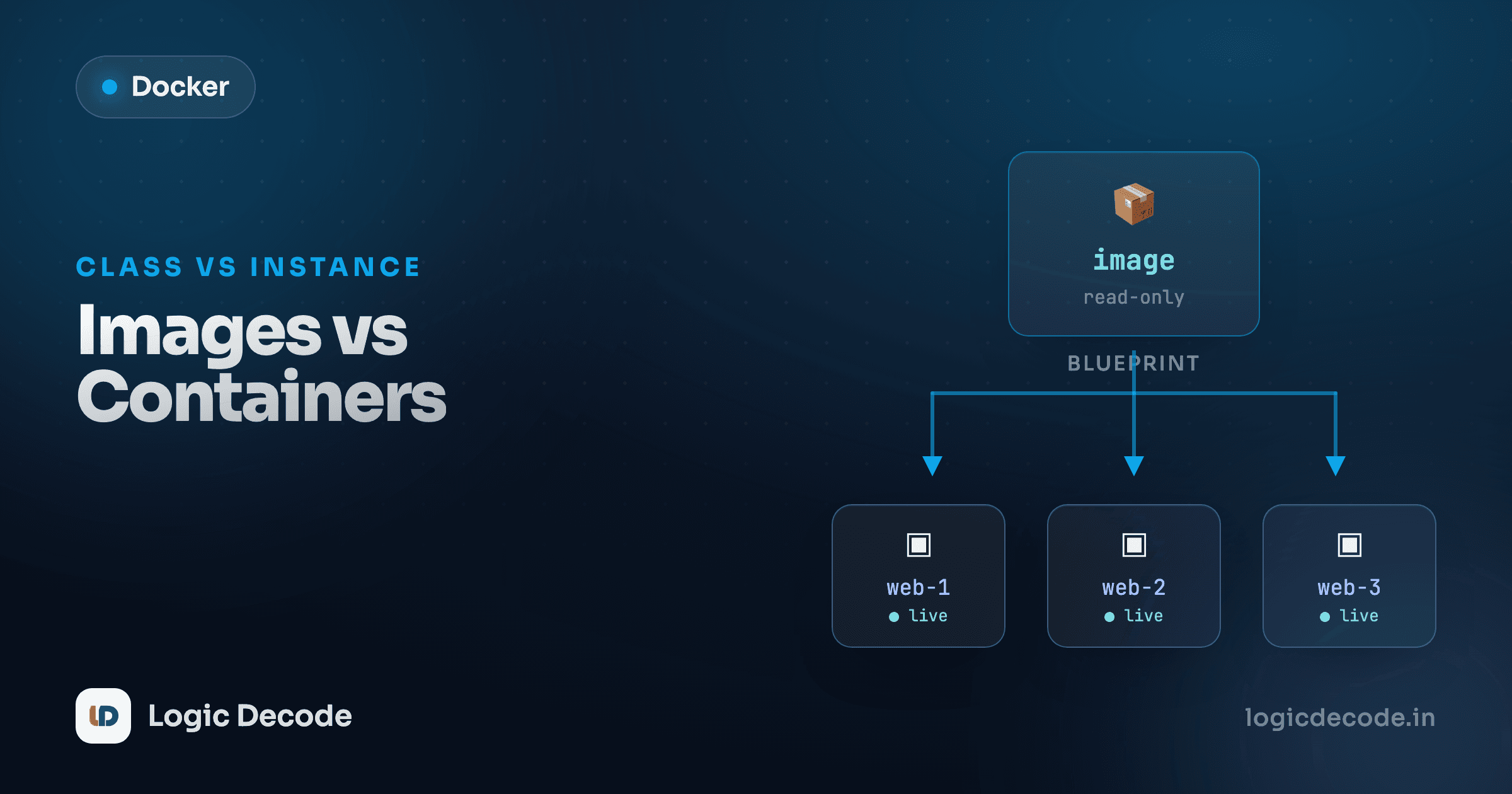
Here's the one-liner: an image is the blueprint, a container is a running instance built from that blueprint. You can spin up ten containers from one image, and they don't step on each other.
The class-and-object analogy
If you've done any object-oriented programming, you already know this shape. An image is a class. A container is an object, an instance you create from the class. One class Dog, many actual dogs.
class Dog:
    def __init__(self):
        self.tricks = []

rex = Dog()    # one instance
luna = Dog()   # another, totally separate
rex and luna come from the same definition but have their own state. Teach rex a trick and luna doesn't learn it. Same with Docker: one nginx image, and every docker run off it is a fresh, independent container with its own running process and its own scratch space.
If the class/object thing means nothing to you, here's the everyday version: the image is a recipe, the container is the actual meal you cooked from it. The recipe never changes when you cook. You can cook it a hundred times.
An image is a read-only blueprint
An image is a frozen package that contains everything an app needs to run: the application code, the libraries and runtime it depends on, and a snapshot of a filesystem (often a stripped-down Linux). It's built once and then it's read-only. Nothing you do at runtime changes the image itself.
That's why a colleague can pull the exact same image and get the exact same environment. No "but it works on my machine." The machine is the image.
You see the images on your system with one command:
docker imagesREPOSITORY TAG IMAGE ID CREATED SIZE
nginx 1.27 e0c9858e10ed 2 weeks ago 192MB
python 3.12 a5c2f1d8b3e4 3 weeks ago 1.02GBEach row is a blueprint sitting on disk. Nothing is running yet. These are just packages waiting to be launched.
A container is a running instance
Run an image and you get a container:
docker run -d --name web nginx:1.27That docker run does two things: it creates a container from the nginx:1.27 image, and it starts it. Now you have a live process. List the running ones:
docker psCONTAINER ID IMAGE COMMAND STATUS NAMES
3f9a1c2b7e8d nginx:1.27 "/docker-entrypoint.…" Up 4 seconds webThe image (nginx:1.27) is the blueprint. The container (web) is the thing actually serving requests. Run that same line again with a different name and you'd have a second container off the same image, running side by side.
run = create + start
docker run is really "create a container, then start it." Once a container exists you don't run it again. You docker start web to bring it back, docker stop web to halt it. Each fresh docker run makes a brand new container, which is why people accidentally pile up a dozen stopped ones.
The writable layer on top
So if the image is read-only, where does a container write its log files, its temp data, the file you just created inside it? Docker stacks a thin writable layer on top of the image when the container starts. The image layers underneath stay frozen and shared. Only that top layer belongs to the container, and that's where every change goes.
This is what makes containers cheap. Ten containers from one image don't copy 192MB ten times. They share the read-only image layers and each just adds its own little writable layer on top.
It also explains a gotcha: delete a container and its writable layer goes with it. Anything you wrote inside a container is gone the moment you docker rm it, unless you stored it outside (volumes, which are a later lesson). The image is untouched either way.
Where images come from: registries
You didn't build that nginx image. You downloaded it from a registry, a server that hosts images for anyone to pull. The default public one is Docker Hub, and docker run nginx quietly pulls from it the first time if you don't already have the image locally.
You can also pull explicitly without running anything:
docker pull nginx:1.27That fetches the blueprint to your machine and stops there. No container, nothing started. Now docker images shows it, and any later docker run nginx:1.27 launches instantly because it's already local.
That's the whole lifecycle on one screen: pull a blueprint down from a registry, then run it as many independent containers as you want.
Tags: pin your versions
Notice the :1.27 hanging off nginx. That's the tag, and it picks which version of the image you want. Leave it off and Docker assumes latest:
docker pull nginx          # same as nginx:latest
docker pull nginx:1.27     # a specific version
docker pull nginx:1.27.0   # even more specific
Here's the trap: latest is not magic and it does not mean "the newest forever." It's just a default tag name that points at whatever the maintainer last tagged as latest. Pull nginx:latest today and again in three months and you might silently get a different version: new behaviour, maybe a breaking change, and a build that worked yesterday now failing for reasons you can't see.
Pin it in real projects
Use a specific tag (nginx:1.27) anywhere it matters. latest is fine for poking around. It's a liability in anything you, your team, or a CI pipeline depend on. Pinning is how you make "works on my machine" actually mean "works everywhere."
Quick check
You run `docker run nginx:1.27` three times. What do you end up with?
Cleaning up: remove containers, then images
Images take up real disk space, and they pile up fast. To remove one, use docker rmi (rm-image) with the name or ID:
docker rmi nginx:1.27But Docker will refuse if any container, even a stopped one, still depends on that image. The blueprint can't be torn up while an instance built from it still exists. So the order is: get rid of the containers first, then the image.
docker rm web           # remove the container (stop it first if running)
docker rmi nginx:1.27   # now the image will delete
If you just want to reclaim space from everything unused, docker image prune clears out dangling images. Treat it gently. It deletes, it doesn't ask twice.
Recap and what's next
The whole mental model fits in two sentences. An image is a read-only blueprint (app, dependencies, and a filesystem snapshot) that you pull from a registry like Docker Hub and pin to a specific tag. A container is a running instance of that image, with its own thin writable layer on top, and you can run many containers from one image, just like many objects from one class. Manage them with docker images / docker rmi for the blueprints and docker ps / docker rm for the instances. Want the official deep-dive on images? Docker's "What is an image?" is a good companion read.
Up to now you've only run other people's images. Next we flip it around and build your own: Dockerfile basics, where you write the recipe that becomes an image.

Written by
Rhythm Bhiwani
Engineer and relentless builder, happiest reverse-engineering hard problems until they click.
Enjoyed this?
Tap the heart to leave some love.
Be the first to react
Comments
Join the conversation.
Loading comments…