TypeScript Arrays, Objects and Tuples
Type collections in TypeScript: arrays, object types, tuples, and the differences that matter, with clear, runnable examples.

Most real data isn't a single number or string. It's a list of users, a config object, a coordinate pair. TypeScript only earns its keep when it can describe those shapes, so this lesson is about typing the three collections you'll reach for every day: arrays, objects, and tuples. Get these right and the compiler starts catching the bugs that used to ship.
Typing arrays
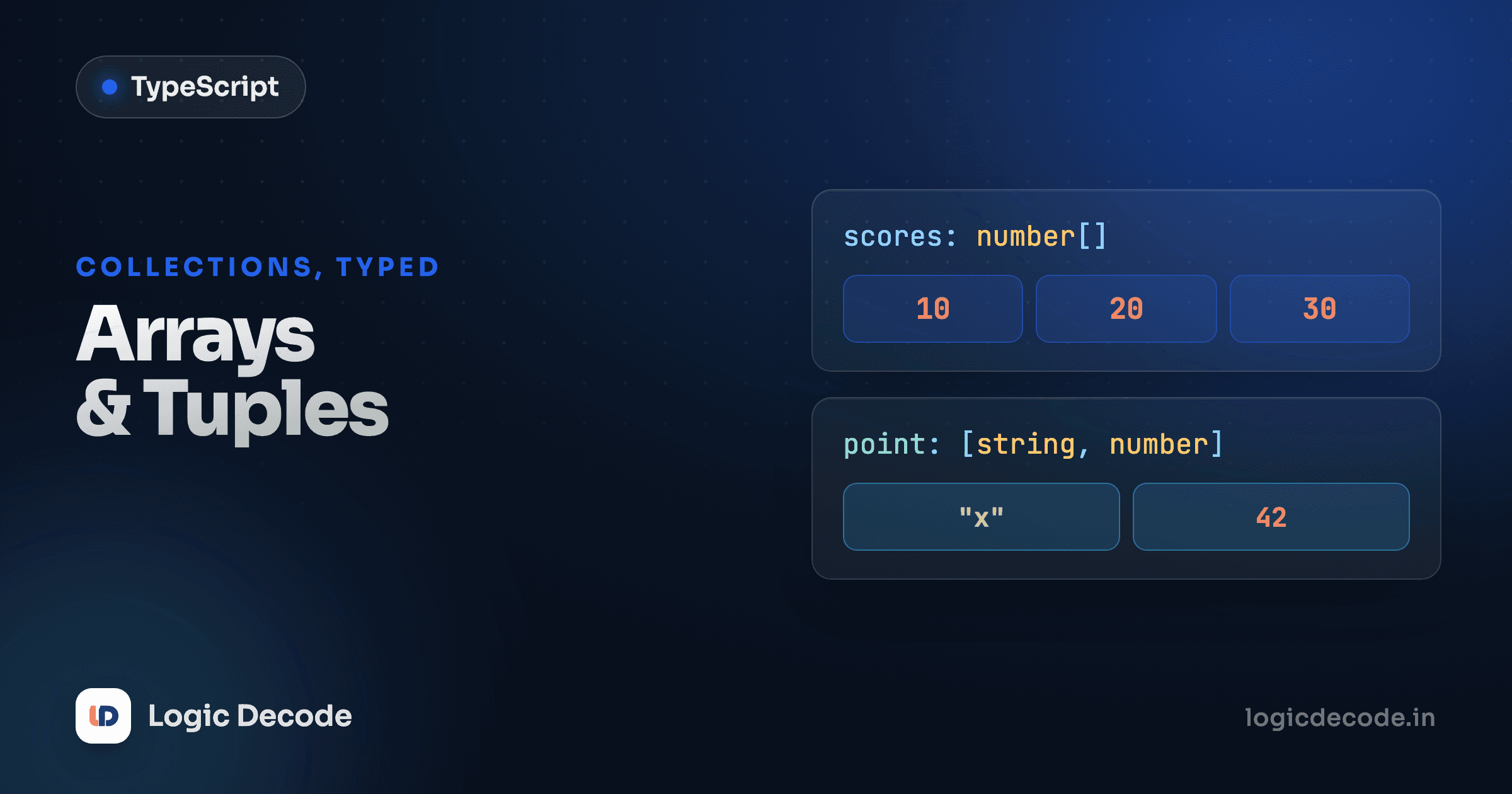
An array of strings is string[]. An array of numbers is number[]. The element type, then square brackets.
The annotation does two jobs. It stops you putting the wrong type in, and it tells TypeScript what comes out, so scores is known to hold numbers, and Math.max(...scores) type-checks without a complaint. Uncomment the push(42) line and you'll see the editor flag it before you ever run the code.
There's a second way to write the same type: Array<string>. It means exactly what string[] means.
const names: Array<string> = ["Maya", "Aarav"];
const scores: Array<number> = [88, 92];
Which to use? string[] is shorter and what most codebases lean on, so make that your default. Array<T> reads better when the element type is itself complex. Array<{ id: number; name: string }> is easier on the eyes than { id: number; name: string }[]. Pick whichever keeps the line readable. They compile to the identical type.
Arrays of objects
A list of plain values is rare. You usually have a list of things (users, products, orders) and each thing is an object with its own shape. The clean way to type that: describe the object once, then say "an array of those."
interface User names the shape once. Then User[] is the whole list, and that one annotation flows everywhere: inside .filter and .map, the u parameter is known to be a User, so u.active and u.name autocomplete and type-check for free. Misspell it as u.activ and you get a red squiggle instead of a silent undefined at runtime.
This is the pattern you'll write more than any other in real TypeScript. Define the row type, then the array of rows.
Inline object types vs named interfaces
You don't always need a named interface. You can write the object's shape inline, right in the annotation:
let point: { x: number; y: number } = { x: 3, y: 7 };That's fine for a one-off. The moment the same shape shows up in two places (a function parameter, a return value, an array) give it a name with interface or type. Inline shapes copy-pasted around are how a field gets renamed in four spots and forgotten in the fifth.
// good for a single, local value
function distance(p: { x: number; y: number }) {
  return Math.hypot(p.x, p.y);
}
We covered interface vs type in Interfaces and types. For object shapes they're interchangeable. The real call here is inline vs named, and the rule is simple: name it the second time you'd otherwise repeat it.
Quick check
What's the type of a list of products, where each product has a name (string) and price (number)?
Tuples: fixed length, position matters
An array like string[] can have any number of items, all the same type. A tuple is the opposite: a fixed number of items, where each position has its own type. You write it with the types in order inside square brackets.
[number, number] says exactly two numbers. [string, number, boolean] says three items in that specific order, and TypeScript tracks the type of each slot. record[0] is a string you can call .toUpperCase() on, record[1] is a number you can multiply. Give it the wrong count or the wrong type in a slot and it complains. A plain (string | number | boolean)[] would lose all of that. A tuple is how you say "this is a pair/triple with a fixed layout."
You meet tuples constantly in React, even if you've never typed one. useState returns a tuple, the current value and its setter:
// useState returns [value, setterFunction]
const [count, setCount] = useState(0);
//     ^number  ^function that takes a number
That destructuring works because the return type is a tuple: position 0 is the state, position 1 is the setter. It's also why you can name them anything ([count, setCount], [name, setName]). The names come from you, the types come from the tuple positions. More on this in TypeScript with React.
Tuples are still arrays at runtime
A tuple is a compile-time fiction layered over a normal JavaScript array. push still exists and TypeScript won't stop you calling it, so location.push(99) slips past the type checker even though it breaks the "exactly two" promise. Tuples protect you at the point of assignment and access. Don't lean on them to police mutation.
readonly: lock it down
If a list or tuple shouldn't change after it's built, say so with readonly. The compiler then rejects any method or assignment that would mutate it.
readonly string[] gives you a list you can read and iterate but not modify. The mutating methods (push, pop, splice, sort) simply aren't there, and assigning to an index is an error. It's the right type for data you receive and shouldn't touch: function parameters you don't intend to mutate, config you load once, constants. Tuples take readonly too, which is great for fixed records like an RGB triple that should never grow a fourth channel.
Record: typing a map of keys to values
One more shape worth knowing. When you've got an object used as a lookup table (keys mapping to values of the same type) don't hand-list every key. Use Record<Keys, Value>.
Record<string, number> means "an object with string keys, every value a number," perfect for a scoreboard or a counts-by-word tally where you don't know the keys ahead of time. Swap string for a union of literal strings, like Record<Role, number>, and TypeScript demands every role be present and rejects any key that isn't one of the three. That second form turns a config object into something the compiler fully checks. Unions like Role are the next big idea, and we dig into them in Unions and narrowing.
Recap and what's next
Arrays are T[] (or Array<T>) for any number of same-typed items. An array of objects is Type[] where you define Type once as an interface. Inline object types are fine for one-offs, but name the shape the moment you'd repeat it. Tuples are fixed-length, position-typed lists like [string, number], and they're exactly what useState and other paired returns hand you. Reach for readonly to forbid mutation, and Record<K, V> to type a key-to-value map. The official handbook's tuple types section is a good reference once these click.
Next up: what happens when a value can be one of several types. Unions and narrowing is where TypeScript stops being a stricter JavaScript and starts being genuinely smarter than you about your own code.

Written by
Rhythm Bhiwani
Engineer and relentless builder, happiest reverse-engineering hard problems until they click.
Enjoyed this?
Tap the heart to leave some love.
Be the first to react
Comments
Join the conversation.
Loading comments…