Why Git? Version Control, Explained
What Git and version control are, the problems they solve, and the mental model of commits as save points, the safety net under every project you build.

You've done this. The project works, finally, after an hour of fighting it. So you copy the folder, name it project-backup, and start poking at the next feature. An hour later it's broken, you can't remember what you changed, and you're staring at project-final, project-final-v2, and project-final-FINAL-actually-this-one, trying to guess which one still ran. Git exists to kill that whole genre of suffering.
The mess version control cleans up
Before you ever touch a command, look at the problems honestly. If you've written code, or even a long document, you've hit all of these:
- The folder graveyard.
report.docx,report_v2.docx,report_final.docx,report_final_USE_THIS.docx. Nobody knows which is real. The dates on the files lie because you copied them. - Fear of touching working code. It runs. You want to refactor it, but if you break it you might not be able to get back. So you don't. The code rots because changing it feels like defusing a bomb.
- "What changed?" Something worked yesterday and doesn't today. You changed something across forty files. Good luck spotting it by eye.
- Collaboration by overwrite. Two people edit the same file, email it back and forth, and one person's work silently lands on top of the other's. Or you're zipping folders and pasting them into a shared drive named
FINAL_SHARE_v3.
Every one of these is a version-control problem. Version control is just software whose entire job is to track changes to your files over time (who changed what, when, and why) and let you move freely between those versions without losing anything.
Git is the version-control system that won. Not the first one, not the friendliest at first, but the one essentially every company, open-source project, and serious developer uses today. Learn Git and you've learned the thing the whole industry standardized on.
Commits: save points you can return to
Here's the one mental model that makes the rest of Git click. A commit is a snapshot of your entire project at a moment in time, with a message saying what you did. Think of it like a save point in a video game.
When you reach a checkpoint in a game, the game freezes the world: your position, your inventory, your health, all of it. Die later and you respawn exactly there, with everything intact. A commit is that checkpoint for your code. You make some changes, you commit, and Git tucks away a complete snapshot you can return to whenever you want.
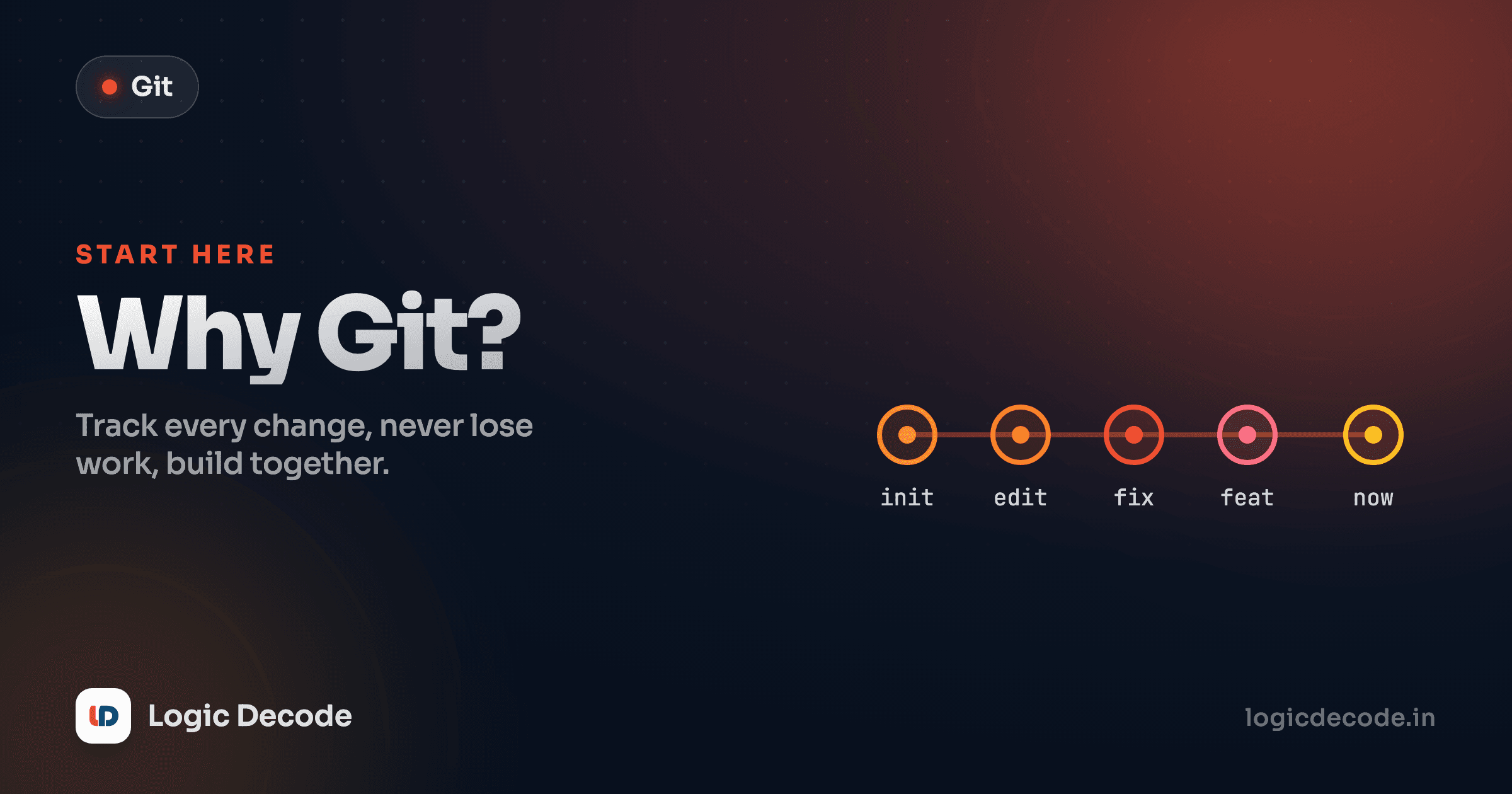
So instead of a folder full of _v2 copies, your project has a timeline: a line of commits, each one a save point, each labelled with what changed.
Read that left to right. Every dot is a commit, a frozen snapshot of the whole project, in the order you made them. The newest is on the right. That line is your history. You can stand on any dot and see exactly what the project looked like then. Broke something three commits ago? Look back, compare, and recover. Nothing is ever silently lost, because every state you committed is still sitting there in the timeline.
In practice, building a small to-do app, the timeline reads like a story:
git log --oneline9f2c1ab Add dark mode toggle
4ad77e0 Fix typo in the header
b81e3c2 Style the task list
e5a90f4 Add the "delete task" button
1c0fb7d Initial commitThat's the cure for "what changed?" Each line is a save point with a human message. Maya can read down that list and know the whole history of the project in ten seconds, and if dark mode broke something, she knows exactly which commit to inspect.
A commit message is a note to future-you
Write commit messages for the person who reads them in three months, usually you, with no memory of today. Fix bug is useless. Fix crash when the task list is empty tells future-you exactly what that save point was for.
How a commit actually happens
You don't snapshot every keystroke. You decide when a moment is worth saving, and you tell Git. The basic loop, once a project is set up, is three commands:
git add .
git commit -m "Add the dark mode toggle"
git status
git add says "these changes are the ones I want in the next snapshot." git commit -m "..." freezes them into a save point with that message. git status shows you where things stand. We'll go deep on each of these in the next lessons. For now, the point is that you choose your checkpoints, deliberately, the way you'd save a game before a boss fight.
Quick check
What is a Git commit, in one sentence?
Distributed: everyone has the whole history
Here's the part that quietly changes how teams work. Git is distributed. When you copy a Git project (you "clone" it), you don't get the latest files. You get the entire history, every commit ever made, on your own machine.
That has real consequences. You can commit, look back through history, and create save points with no internet connection, because the full timeline lives in a hidden .git folder right next to your code. There's no single fragile server that, if it dies, takes the project's history with it. Every developer who cloned the repo is walking around with a complete backup.
GitHub (the website) is just a shared copy everyone agrees to sync with, a common meeting point, not the One True Original. Alex, Sam, and Kabir each have the full project locally. They push their commits up to GitHub and pull down each other's. Two people editing the same file is no longer a disaster, because Git can merge their changes intelligently instead of one overwriting the other (and where it genuinely can't decide, it asks, which is a later lesson on conflicts). The email-the-zip-around era is over.
This is also why Git and GitHub get mentioned in the same breath but aren't the same thing. Git is the tool on your machine that tracks versions. GitHub is a service that hosts Git projects online so people can collaborate. You can use Git completely alone, offline, forever, and never open GitHub. Most people don't, but you could.
Why this isn't optional in 2026
Some skills are nice-to-have. Git isn't one of them. It's as essential to working in software as AI literacy: a baseline everyone is just expected to have.
Open almost any job posting for a developer, data scientist, or even a technical writer and "version control / Git" sits in the requirements next to the languages. Every team you'll join already runs on it. Every open-source project you might contribute to lives on GitHub or something like it. Code review, deployment, automated testing: the entire modern workflow is built on top of Git commits and branches. Skip Git and you're not opting out of a tool, you're opting out of how software is actually built.
The good news: the daily core is small. A handful of commands and the save-point mental model carry you through ninety percent of real work. That's exactly what this series builds, in order.
What this series covers
This is lesson one of Git & GitHub. The plan from here:
- Next up: Your first repository. Turn a plain folder into a Git project and make your very first commit.
- Then staging, commits, and reading history. Branching so you can work on features without touching the working version. Merging that work back together and handling conflicts when they happen.
- Undoing mistakes without panic (Git's real superpower), then GitHub itself: remotes, pull requests, and a final lesson tying it all into a realistic feature-branch workflow.
If you're coming from one of the coding tracks (the Python series or Why Learn JavaScript), this is the tool that wraps around all of it. You write code in those. You manage it with this.
For a deeper, language-agnostic take on the history and theory, the official Git book has a great chapter: About Version Control. But you don't need it to start. You need a folder and the next lesson.
The whole idea fits in one sentence: Git turns your project into a timeline of save points you can always return to, alone or with a team. Once you've felt that safety net, you'll never go back to copying folders. Let's make your first commit.

Written by
Rhythm Bhiwani
Engineer and relentless builder, happiest reverse-engineering hard problems until they click.
Enjoyed this?
Tap the heart to leave some love.
Be the first to react
Comments
Join the conversation.
Loading comments…