Why Docker? Containers vs Virtual Machines
What containers are, the 'works on my machine' problem they solve, and how they differ from virtual machines: the mental model before you run anything.

You finish a feature, it runs perfectly on your laptop, you push it, and within an hour someone messages: "it crashes on my machine." Same code, different result. They're on a newer Python, you pinned a library version they don't have, their OS resolves a path differently. You've just met the oldest bug in software that isn't a bug in your software at all. Docker exists to kill this exact problem, and once you get the mental model, the rest of this series is mostly typing commands.
The "works on my machine" problem
Your code never runs alone. It runs on top of a language runtime, a pile of installed libraries at specific versions, system tools, environment variables, and an operating system that all behave a particular way. That whole stack is the environment. When your environment and your teammate's environment differ, even slightly, the same code can do different things.
For years the answer was a README full of setup steps: install this version of Node, that database, set these three variables, run this before that. It never fully worked. Someone always had a different OS, a leftover global package, or skipped step 4. Multiply that across a team, a CI server, and a production machine, and you spend more time fixing environments than writing code.
The honest fix isn't "write better setup docs." It's: stop shipping just the code, and ship the environment with it.
What a container actually is
A container is your application plus everything it needs to run (the runtime, the libraries, the system tools, the config) packaged into one unit that runs the same way on any machine that has Docker. You build that package once. It runs identically on your laptop, your teammate's laptop, the CI server, and the production server, because all of them are running the same bundled environment, not their own.
That's the whole pitch. The "works on my machine" excuse dies because everyone's machine is now running the identical packaged thing. There is no "my machine" anymore. There's just the container.
A quick taste of what that looks like in practice. With Docker installed, this runs a real web server with nothing installed on your system but Docker itself:
docker run -d -p 8080:80 nginxOpen http://localhost:8080 and you'll see the nginx welcome page. You didn't install nginx. You didn't configure it. Docker pulled a prepackaged container, started it, and wired up port 8080. When you're done:
docker stop $(docker ps -q --filter ancestor=nginx)It's gone, and your system is exactly as clean as before. That repeatability (same input, same result, no residue) is the point. (Don't worry about what every flag means yet. That's the next lesson.)
A container vs an image
You'll hear both words constantly. An image is the packaged, frozen recipe, the app and its environment saved to disk. A container is a running instance of that image, like a process started from a program. One image, many containers. We dig into the distinction in lesson 3.
Containers vs virtual machines
If you've used a VM (VirtualBox, VMware, a cloud instance) this sounds familiar: an isolated, portable environment for your software. So why not just use VMs? The difference is in what each one duplicates, and it's the whole reason Docker took over.
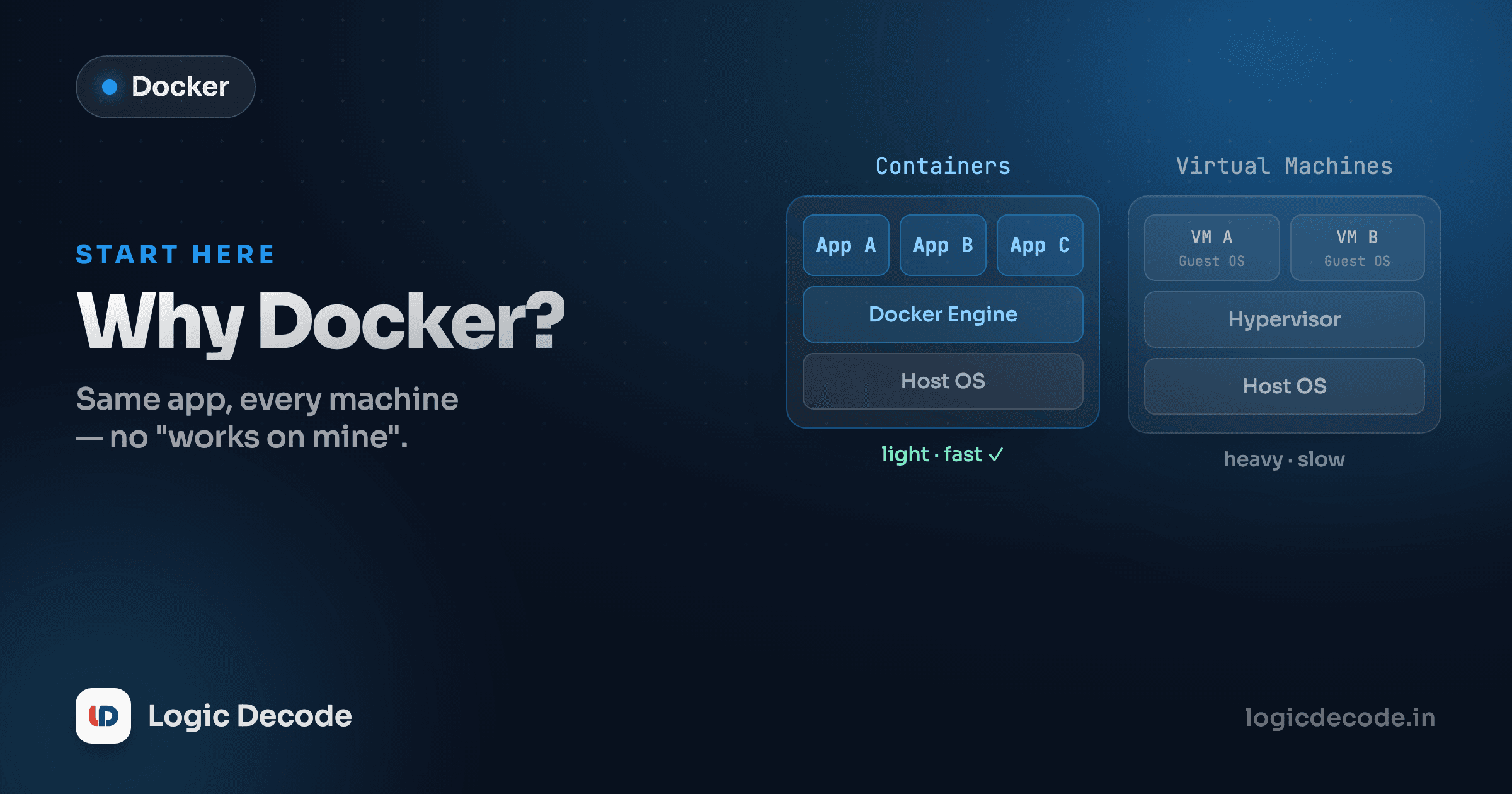
A virtual machine emulates an entire computer. On top of your hardware and host OS sits a hypervisor, and on top of that runs a complete guest operating system (a full Linux or Windows install, kernel and all) and your app lives inside that. Every VM you spin up drags along a whole separate OS. That's why VMs are measured in gigabytes and boot in minutes.
A container skips all that. It shares the host machine's OS kernel instead of bundling its own. Docker's engine isolates each container so it thinks it has its own clean system, but underneath they all use the one kernel already running. No guest OS per app. So a container ships only your app and its dependencies (often tens of megabytes) and starts in well under a second.
Read the two stacks top to bottom. The VM side repeats a full guest OS for every app. The container side has one host OS and one Docker engine shared across all of them, with only the apps stacked on top. That missing layer is the entire story: it's why containers are lighter, faster to start, and why you can run a dozen on a laptop where a dozen VMs would melt it.
The trade-off is real, not free. Because containers share the host kernel, they're a thinner isolation boundary than a VM, and a Linux container expects a Linux kernel (on a Mac or Windows, Docker quietly runs a tiny Linux VM to provide one). For the overwhelming majority of app-shipping work, that trade is worth it, and it's why containers, not VMs, became the default unit for moving software around.
Quick check
Why does a container start faster and use less disk than a virtual machine?
Why this matters in 2026
This isn't a niche tool you might pick up someday. By 2026 roughly 71% of organizations report using containers in production. They've become the default way teams build, share, and ship software. When a job posting lists "Docker," it's not asking whether you've heard of it; it assumes you can package an app and run it. Cloud platforms, CI pipelines, and deployment tooling are all built around the container as the basic unit.
The reason it stuck is the same reason it solves the opening problem: a container is a contract. "Here's my app and the exact environment it needs. Run it." That contract holds from your laptop to a server farm without anyone editing a setup doc.
And once you can run one container reliably, the natural next question is running many of them: across multiple machines, restarting the ones that crash, scaling up under load. That's Kubernetes, the orchestration tool you'll keep hearing about. It's a real topic for later. Docker and a single container is the foundation it's built on, and that's where you start.
What this series covers
You now have the mental model: a container packages your app with its environment so it runs the same everywhere, and it stays lightweight by sharing the host kernel instead of hauling a whole OS like a VM does. That's the idea everything else builds on.
From here we get hands-on. Next up: Your first container — you'll run, inspect, and stop real containers and finally see what those docker run flags actually do. If you haven't met version control or lived in a terminal yet, Why Git? and the command-line series pair naturally with this one. Docker assumes you're comfortable typing commands.
For the canonical reference as you go, the Docker overview docs are worth a bookmark. But you don't need them to start. You need a clear head about what a container is, and now you've got it.

Written by
Rhythm Bhiwani
Engineer and relentless builder, happiest reverse-engineering hard problems until they click.
Enjoyed this?
Tap the heart to leave some love.
Be the first to react
Comments
Join the conversation.
Loading comments…